> For the complete documentation index, see [llms.txt](https://user.netmera.com/netmera-user-guide/llms.txt). Markdown versions of documentation pages are available by appending `.md` to page URLs; this page is available as [Markdown](https://user.netmera.com/netmera-user-guide/messaging-features/transactional-messaging.md).
# Transactional messaging
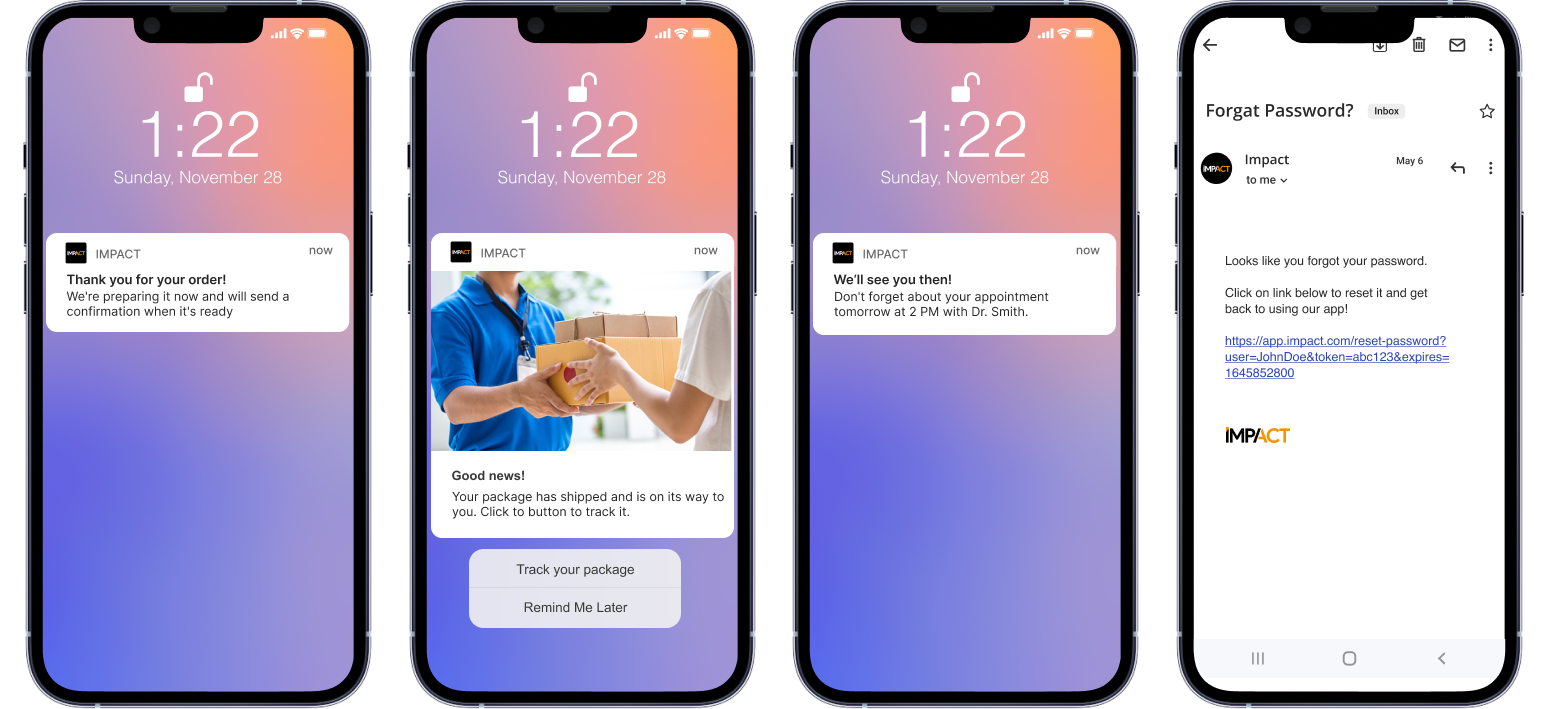
Transactional messages send user-level updates through the API, such as order confirmations and password resets.
Transactional Messages let you send **user-level messages through backend / API**.
They are usually immediate, context-specific, and triggered by a user action or a system event.
Use them for messages such as:
* order confirmation
* shipping update
* appointment reminder
* password reset
**Path:** `Messages > Transactional > Create New Transactional Message`
{% hint style="info" %}
**Quick steps**
1. Create the transactional template in the panel.
2. Set a **Message Key** to identify it in API calls.
3. Add **Message Parameters** for personalization (profile attributes).
4. Decide if the API can override message settings.
5. Configure **limits** and **time restrictions** if needed.
6. Use **Sample Request** to test before production use.
{% endhint %}
{% @arcade/embed url="" flowId="omtARAmxa2m3sX2QCQHa" %}
### How Transactional Messaging works
Transactional Messages follow the standard message flow, with one extra step: **API & Config**.
Use this extra step to define how your backend will call the message and which parts can be controlled dynamically.
This model is useful when the trigger comes from your own backend instead of a panel-side event rule.
### Standard message steps
Transactional Messages still use the standard campaign steps:
* **Setup** — define the message name and base settings.
* **What** — create the message content.
* **Who** — define the recipient scope or targeting logic.
* **Go** — review the configuration before production use.
The extra step for this message type is **API & Config**.
This is the only part that is specific to Transactional Messages.
{% hint style="info" %}
There is no separate custom flow instead of **Setup** and **What**.
Transactional Messages use the standard message steps plus **API & Config**.
{% endhint %}
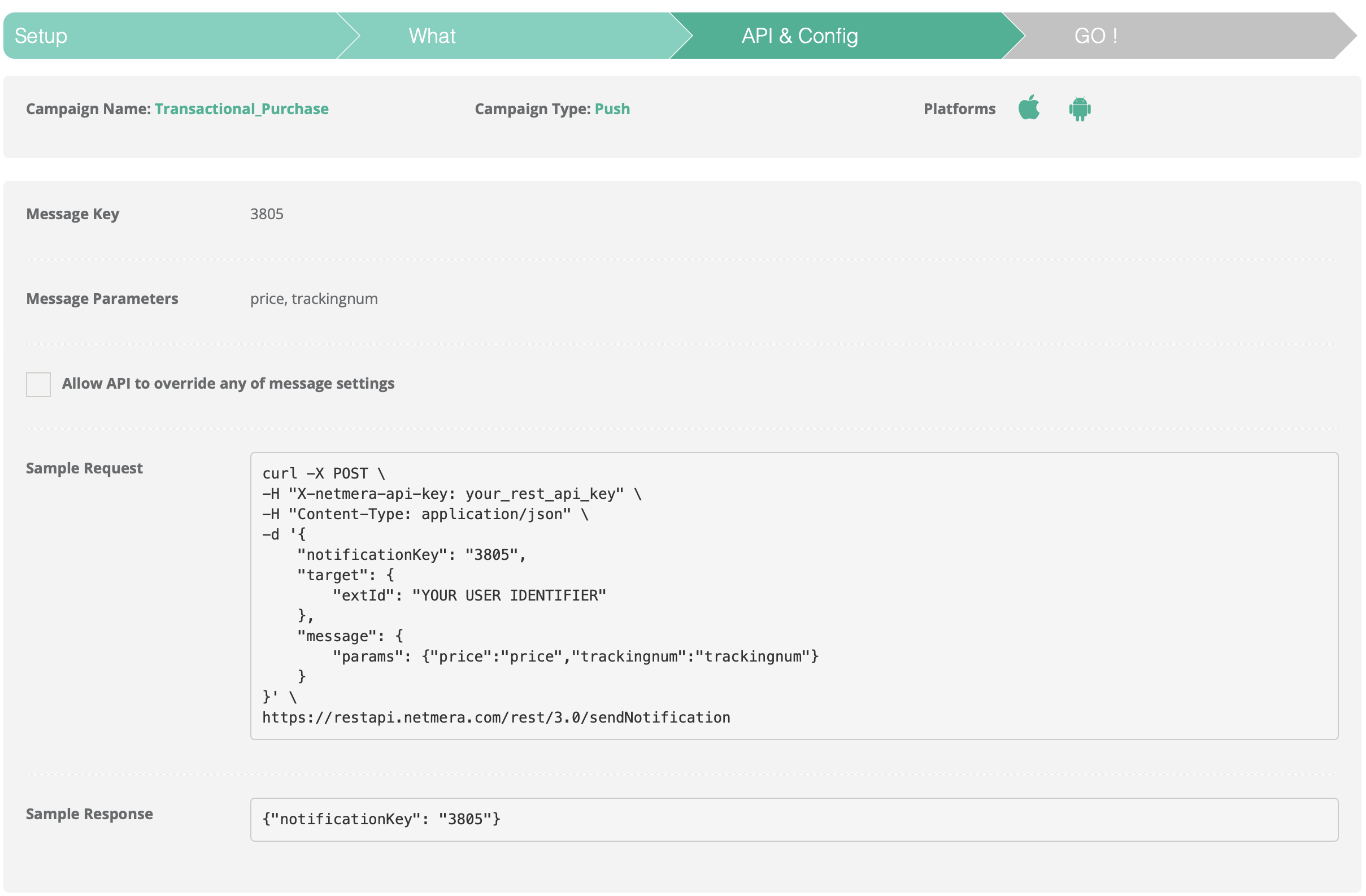
### API & Config
This step defines how your backend sends the message.
It also defines what can be customized in each API call.
#### Message Key
A unique identifier for this transactional message. Use it to reference the message in API calls and reporting.
Choose a stable and descriptive key.
This makes backend integration, debugging, and reporting easier.
#### Message Parameters
Parameters are values injected into the message content.
They usually map to profile attributes or payload fields.
Examples:
* user name
* order number
* membership tier
Use parameters when the message content must change per user or per request.
#### Allow API to override any of message settings
If enabled, the API caller can override settings at send time.
This includes content and delivery-related settings.
{% hint style="info" %}
Enable this when the backend must control message details dynamically.
Disable it when the panel template must stay fixed.
{% endhint %}
#### Sample Request
Use Sample Request to test the message with a real API call. This helps verify payload and personalization before production.
#### Sample Response
Sample Response shows whether the request succeeded. Use it to debug errors and validate delivery.
API & Config
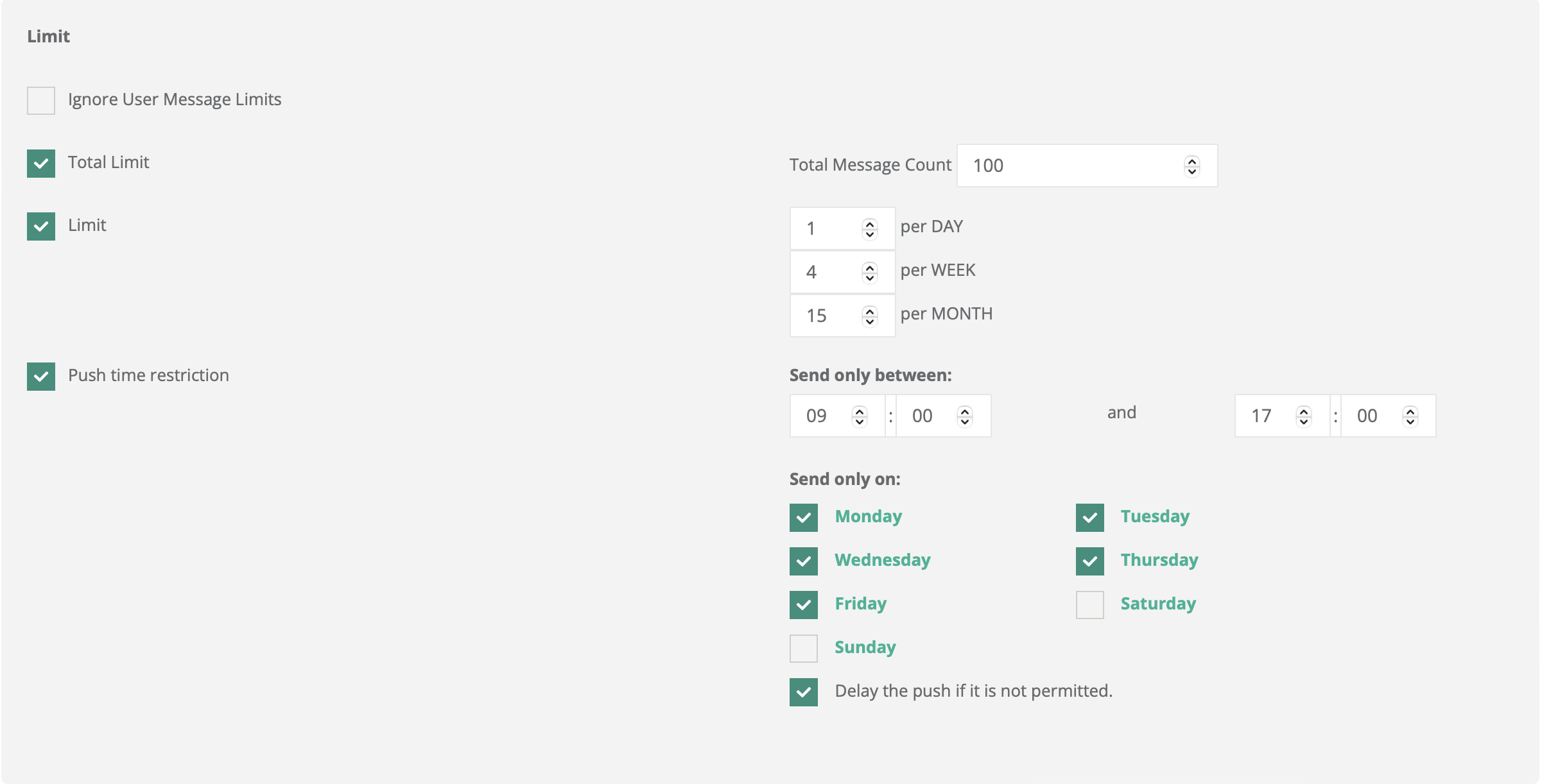
### Limits and time restrictions
Use limits to control volume. Use time restrictions to control delivery windows.
This is useful when transactional traffic must stay controlled even though it is API-triggered.
#### Ignore User Message Limits
Bypass user-level message limits for this transactional message. Use this carefully.
It can be useful for critical messages that must bypass standard caps.
#### Total Limit
Cap the total number of sends allowed for this transactional message.
Use this when the message should stop after a defined volume.
#### Limit
Cap how often the same user can receive the message within a selected period.
Use it to prevent repeated sends to the same user.
#### Push Time Restriction
Restrict sending to specific hours or days.
Use this when delivery should happen only in approved time windows.
Limit
{% hint style="warning" %}
Transactional Messages are API-triggered, but delivery rules still apply.
Use limits and time restrictions to avoid unwanted volume or off-hours sending.
{% endhint %}
### Other steps
After **API & Config**, continue with the standard message steps.
These steps match the regular message flow:
* **Setup**
* **What**
* **Who**
* **Go**
Use those steps to configure the content, audience, and final review of the transactional template.
{% hint style="success" %}
Think of **API & Config** as the integration layer.
The remaining steps define the message template itself.
{% endhint %}
---
# Agent Instructions
This documentation is published with GitBook. GitBook is the documentation platform designed so that both humans and AI agents can read, navigate, and reason over technical content effectively. Learn more at gitbook.com.
## Querying This Documentation
If you need additional information that is not directly available in this page, you can query the documentation by asking a question.
Perform an HTTP GET request on the following URL with the `ask` and `goal` query parameters:
```
GET https://user.netmera.com/netmera-user-guide/messaging-features/transactional-messaging.md?ask=&goal=
```
`ask` is the immediate question: it should be specific, self-contained, and written in natural language.
`goal` is what the user is ultimately trying to achieve, the reason they need the answer. Sharing it helps GitBook give you a better, more relevant answer. A goal is most helpful when it describes the outcome the user wants rather than restating the question. For example, with `ask=how do I create an API token`, a goal like `automate deployments from our CI pipeline` lets GitBook tailor the answer to that use case.
The response will contain a direct answer to the question and relevant excerpts and sources from the documentation.
Use this mechanism when the answer is not explicitly present in the current page, you need clarification or additional context, or you want to retrieve related documentation sections.