> For the complete documentation index, see [llms.txt](https://user.netmera.com/netmera-user-guide/llms.txt). Markdown versions of documentation pages are available by appending `.md` to page URLs; this page is available as [Markdown](https://user.netmera.com/netmera-user-guide/customer-data/granular-consent-management.md).

# Granular consent management

Granular consent management lets you manage user permissions by **communication purpose** and delivery channel.

In Netmera, communication purposes are represented by **Message Categories**. Use a category across supported channels. This keeps each purpose consistent for push, SMS, email, and other enabled channels.

For example, you can define:

* `promo` — promotional communications
* `order_tracking` — order and delivery updates
* `security` — account and security notifications

Your users can set separate preferences for each purpose.

{% hint style="info" %}
Granular consent management supports purpose-specific permission structures. You must determine the consent model required for your use case and applicable regulations.
{% endhint %}

### How consent is evaluated

Netmera checks the channel and Message Category before delivering a message.

<table><thead><tr><th width="317.4453125">Permission</th><th>Question</th></tr></thead><tbody><tr><td><strong>Channel permission</strong></td><td>Is the user reachable through this channel?</td></tr><tr><td><strong>Message Category permission</strong></td><td>Is the user subscribed to this communication purpose?</td></tr></tbody></table>

A user must meet the applicable checks before Netmera can deliver a message.

For an SMS campaign with the `promo` category, a user must be reachable by SMS. They must also have the required `promo` preference.

This separates where you can reach a user from why you send a message.

### Set up granular consent

1. Define your communication purposes.
2. Create a Message Category for each purpose.
3. Assign the matching category to each campaign.
4. Let users manage category preferences when required.
5. Configure İYS when it manages SMS or email consent.
6. Verify preferences and campaign eligibility.

### Step 1: Define communication purposes

Identify the communication purposes your organization uses. Create one category for each purpose, not one category for each channel.

| Purpose                            | Message Category |
| ---------------------------------- | ---------------- |
| Promotional communications         | `promo`          |
| Order and delivery updates         | `order_tracking` |
| Account and security notifications | `security`       |

Use the same category for a purpose across supported channels. For example, `promo` can apply to promotional push notifications, SMS messages, and email messages.

Keep Category IDs short, stable, and meaningful. Your integrations and preference management use these IDs.

### Step 2: Create Message Categories

In the Netmera Dashboard, select **Settings** → **Messaging & Content** → **Message Categories**. Create one category for each communication purpose.

* Use one category for one communication purpose.
* Don't create categories only for delivery channels.
* Keep IDs stable after campaigns or integrations use them.
* Use names that users can understand in a preference center.

Learn more about [Message categories](/netmera-user-guide/panel-settings/settings/messaging-and-content/message-categories.md).

<figure><img src="/files/LHhfvrp6Ygho5L1xMysb" alt="Message Categories settings page with the option to create a category."><figcaption><p>Create a category in Settings</p></figcaption></figure>

### Step 3: Assign a category to campaigns

Assign the category that matches the message purpose when you create a campaign.

**Campaign:** 20% discount promotion\
**Channel:** email\
**Message Category:** `promo`

The category describes why you send the message, not how you deliver it.

| Message                    | Channel | Message Category |
| -------------------------- | ------- | ---------------- |
| New product promotion      | Push    | `promo`          |
| Discount announcement      | Email   | `promo`          |
| Order shipped notification | SMS     | `order_tracking` |
| Suspicious login alert     | Push    | `security`       |

{% hint style="info" %}
Before launching a campaign, verify that its Message Category matches the communication purpose.
{% endhint %}

<figure><img src="/files/naNOAsERfxQRneX5fTgm" alt="Campaign creation flow with a Message Category selector."><figcaption><p>Select a category in the campaign flow</p></figcaption></figure>

### Step 4: Let users manage category preferences

Provide a preference center when your consent model requires one. Users can manage their Message Category preferences there.

For example, a user can enable **Order Tracking**, disable **Promotions**, and keep **Security Notifications** enabled.

Use the category preference APIs to retrieve current preferences. Use them to:

* Display available Message Categories.
* Show the current preference for each category.
* Build an in-app preference center.
* Keep your app settings synchronized with Netmera.

Use the same APIs to update preferences after users change them. For example, when a user disables **Promotions**, your app updates their `promo` preference in Netmera.

See the [Developer Guide](https://user.netmera.com/netmera-developer-guide/api-documentation/rest-api/user-and-device-management#category-preferences) for implementation details.

#### Campaign editor examples

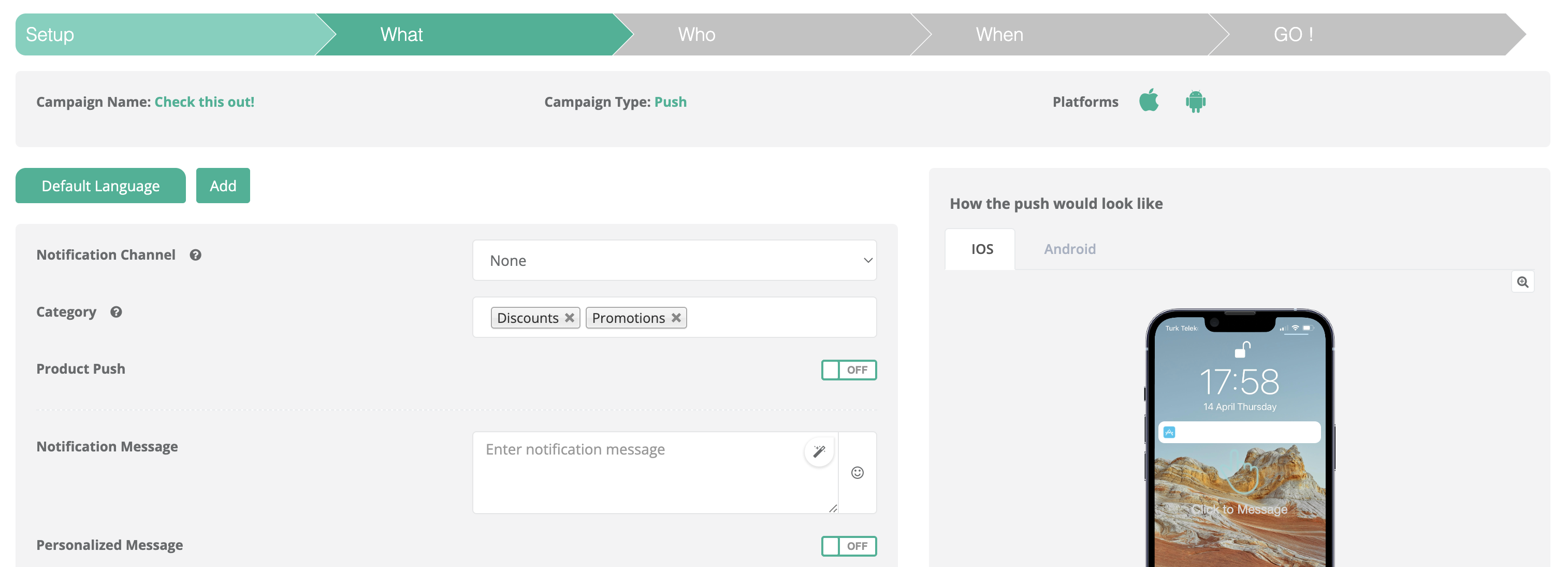
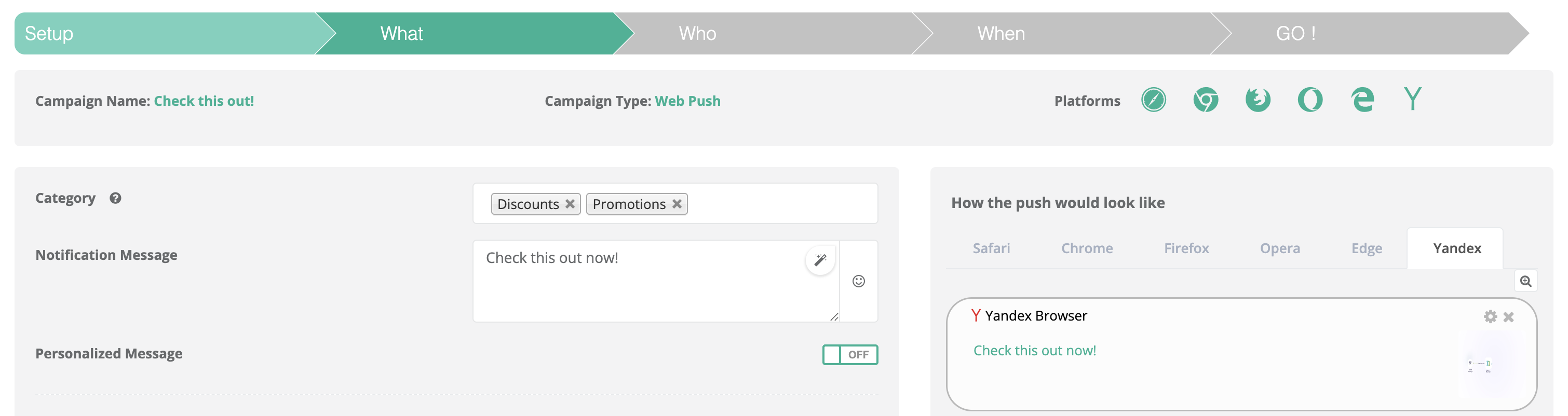
Each channel uses its campaign editor, but the category selection serves the same purpose. Select the category that matches the message before you continue.

<figure><img src="/files/m6NrjVMOxJJdYnQ7gJsZ" alt="Channel-specific campaign editor showing the Message Category selection."><figcaption><p>Select the message category in the campaign editor.</p></figcaption></figure>

<figure><img src="/files/hpNT1rsf3ZrzD71qghfJ" alt="Channel-specific campaign editor showing the Message Category selection."><figcaption><p>Choose the category that matches the message purpose.</p></figcaption></figure>

<figure><img src="/files/0PiRp01RPDCNPICMEYyY" alt="Channel-specific campaign editor showing the Message Category selection."><figcaption><p>Confirm the category before completing campaign setup.</p></figcaption></figure>

### Common implementation pattern

```
Communication purpose
        ↓
Message Category
        ↓
User preference
        ↓
Campaign category
        ↓
Channel and category eligibility
        ↓
Message delivery
```

For a promotional email campaign:

```
Promotion
  ↓
promo
  ↓
User opted in
  ↓
Email campaign uses promo
  ↓
User is reachable by email
  ↓
Eligible for delivery
```

This structure keeps the communication purpose separate from its delivery channel.

### Recommended category structure

Don't create separate categories for the same purpose:

* `push_promo`
* `sms_promo`
* `email_promo`

Use `promo` instead. Then configure the category for every channel that supports promotional messages.

Use `order_tracking`, `security`, and `account_updates` for separate purposes. This keeps category management maintainable as you add channels.

### Developer implementation

Developers can expose category preferences in your app with the Mobile SDK and APIs.

1. Retrieve available category preferences.
2. Display relevant categories in your app settings or preference center.
3. Let users change their preferences.
4. Send preference changes to Netmera.
5. Reflect the updated state in your app.

See the [Developer Guide](https://user.netmera.com/netmera-developer-guide/api-documentation/rest-api/user-and-device-management#category-preferences) for SDK methods and API parameters.

### Step 5: Configure İYS when applicable

If İYS manages SMS or email consent, decide which system owns consent records before configuring the integration.

#### İYS integrator mode

Netmera collects consent information and sends relevant updates to İYS.

#### İYS sync mode

Netmera retrieves consent information from İYS. İYS remains the consent record source.

Choose the mode that matches your consent-management process.

* [İYS permissions](/netmera-user-guide/customer-data/iys-permissions.md)
* [İYS sync mode](/netmera-user-guide/customer-data/iys-permissions/iys-sync-mode.md)
* [İYS integrator mode](/netmera-user-guide/customer-data/iys-permissions/iys-integrator-mode.md)

{% hint style="warning" %}
İYS consent management and Message Categories manage different communication permissions. Configure both for your consent and governance model.
{% endhint %}

### Step 6: Verify user preferences

Test your configuration with a test user after you create categories and preference management.

#### Check User Details

Open [People](/netmera-user-guide/targeting/people.md). Review the user's channel and category preferences.

#### Check Channel Reachability

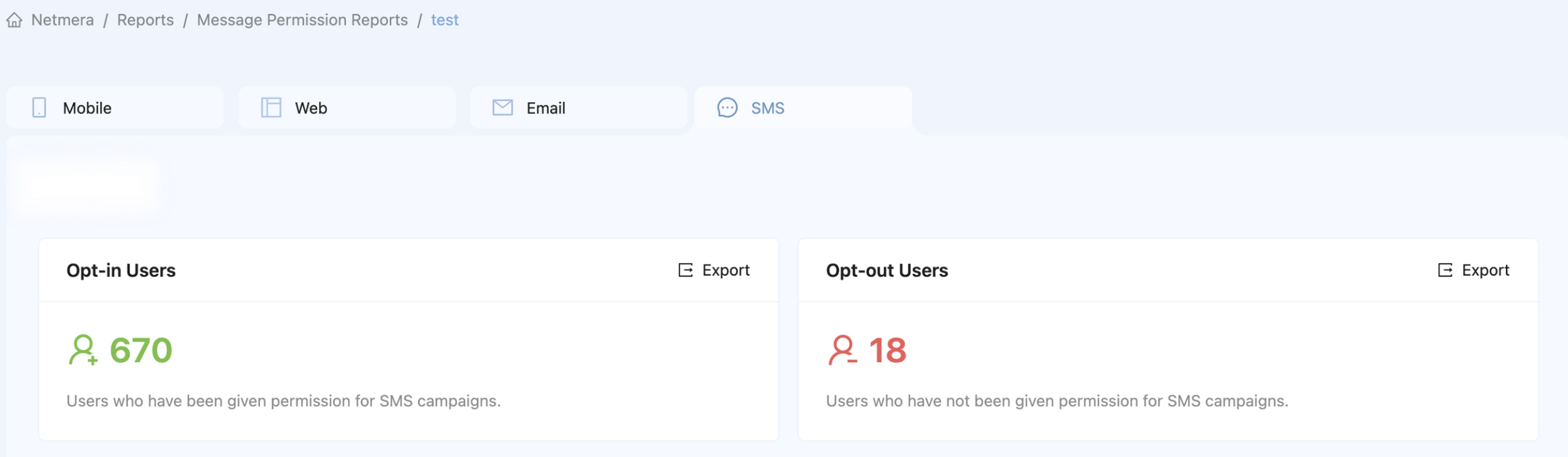
Use [Channel reachability](/netmera-user-guide/reports-and-analytics/reports/audience-and-growth/channel-reachability.md) to review audience reachability and permission information.

### Monitor consent and reachability

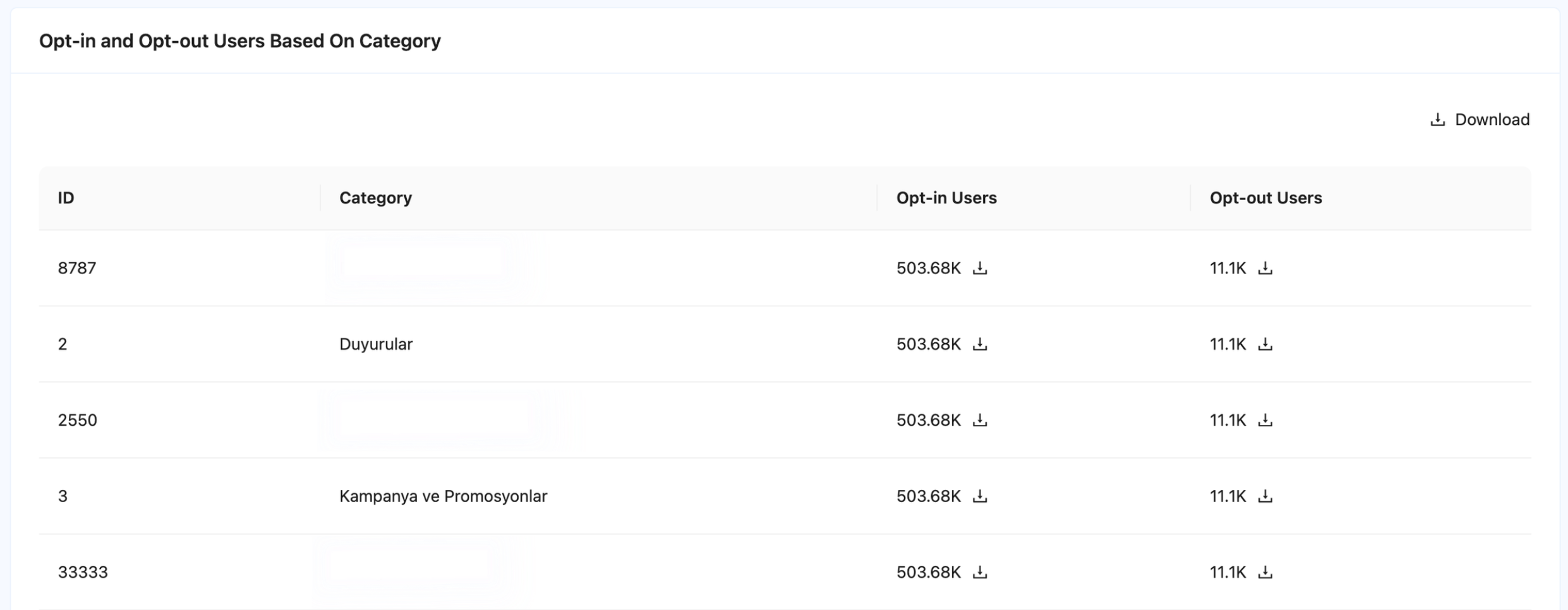
Review channel reachability, category-level audience coverage, user preferences, and campaign category assignments.

For a new category, test both cases:

* **Opted in:** The user has required channel and category permissions.
* **Opted out:** The user doesn't have the required category permission.

This verifies your campaign configuration before a production launch.

<figure><img src="/files/mhKlCXrLR3PQNUsPG596" alt="Channel Reachability report showing permission data by messaging channel."><figcaption><p>Review permission coverage by channel.</p></figcaption></figure>

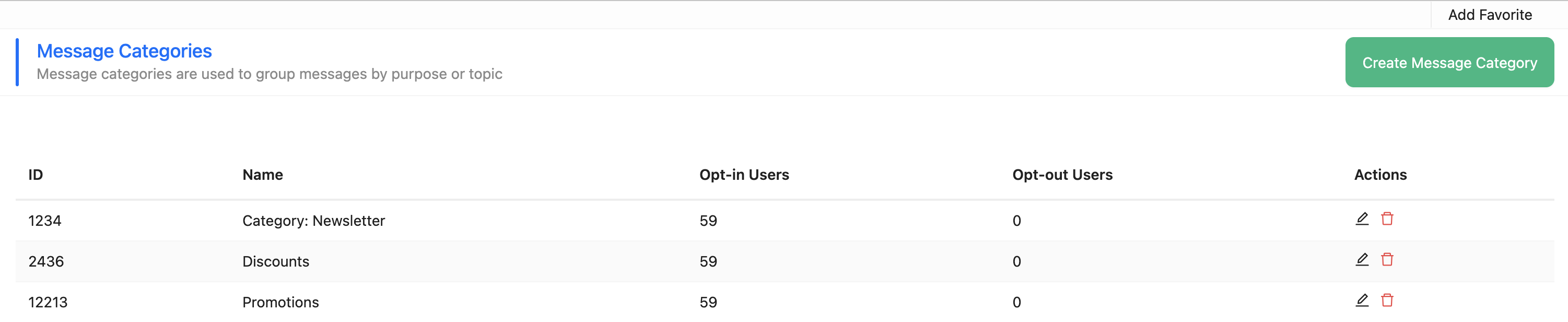
<figure><img src="/files/4svcVA9XUayVdUEN1DBD" alt="Message category report with opt-in and opt-out user counts."><figcaption><p>Opt-in and opt-out users by message category</p></figcaption></figure>

### Related pages

* [Message categories](/netmera-user-guide/panel-settings/settings/messaging-and-content/message-categories.md)
* [İYS permissions](/netmera-user-guide/customer-data/iys-permissions.md)
* [İYS sync mode](/netmera-user-guide/customer-data/iys-permissions/iys-sync-mode.md)
* [İYS integrator mode](/netmera-user-guide/customer-data/iys-permissions/iys-integrator-mode.md)
* [Contact Upload](/netmera-user-guide/targeting/contact-upload.md)
* [Channel reachability](/netmera-user-guide/reports-and-analytics/reports/audience-and-growth/channel-reachability.md)
* [People](/netmera-user-guide/targeting/people.md)
* [Opt out](/netmera-user-guide/reports-and-analytics/analytics/user-and-audience/opt-out.md)
* [Developer Guide](https://user.netmera.com/netmera-developer-guide/api-documentation/rest-api/user-and-device-management#category-preferences)


---

# Agent Instructions
This documentation is published with GitBook. GitBook is the documentation platform designed so that both humans and AI agents can read, navigate, and reason over technical content effectively. Learn more at gitbook.com.

## Querying This Documentation
If you need additional information that is not directly available in this page, you can query the documentation dynamically by asking a question.

Perform an HTTP GET request on the current page URL with the `ask` query parameter, and the optional `goal` query parameter:

```
GET https://user.netmera.com/netmera-user-guide/customer-data/granular-consent-management.md?ask=<question>&goal=<endgoal>
```

`ask` is the immediate question: it should be specific, self-contained, and written in natural language.
`goal` is optional and describes the broader end goal you are ultimately trying to accomplish on behalf of the user. GitBook uses it to tailor the answer towards what is most useful for that goal.

The response will contain a direct answer to the question and relevant excerpts and sources from the documentation.

Use this mechanism when the answer is not explicitly present in the current page, you need clarification or additional context, or you want to retrieve related documentation sections.