> For the complete documentation index, see [llms.txt](https://user.netmera.com/netmera-user-guide/llms.txt). Markdown versions of documentation pages are available by appending `.md` to page URLs; this page is available as [Markdown](https://user.netmera.com/netmera-user-guide/whats-new/2026.md).
# 2026 release notes
See what shipped in Netmera in 2026, including panel themes, control group exports, Journey controls, redesigned widgets, coupon lists and FTP summaries.
### October, 2026
October brings N-Assistant to the Netmera Panel: ask a question about your campaigns in plain language and get insights and recommended next steps from your own Netmera data.
#### N-Assistant
**Ask your Netmera data a question and get the next step**
N-Assistant is Netmera's marketing intelligence assistant, built into the Netmera Panel. Open it from the robot button in the bottom-right corner, ask in plain language, and get an analysis of your campaign, audience and event data together with prioritized recommendations on what to do next.
You can now:
* Ask business questions such as "Analyze the performance of the push notification campaigns I sent recently" or "Look at the click rates of my emails. How can I increase clicks?"
* Get answers with key figures, charts, tables and recommended actions in priority order.
* Work with analytics, campaign reports and A/B tests, workflows and automations, and event and profile attributes from a single conversation.
* Turn the insights you receive into a custom dashboard in your panel.
* Expand the panel for a larger view of charts and tables, and return to previous conversations from your chat history.
**Why this matters**
Find out why a campaign did not get the clicks you expected, what is behind a drop in applications or conversions, and which actions to prioritize, all in one conversation. N-Assistant turns your reports into a clear next step.
N-Assistant works with read-only permission, and your Netmera role decides what it can see. It recommends, and you choose what to apply.
[Meet N-Assistant](/netmera-user-guide/ai-features/n-assistant.md)
## September, 2026
September puts more control in your hands: consent that follows exactly what users choose on each channel, push tests that reach precisely the right people, a security sign-off for every web change, and redesigned Segments, People, and Journey screens that take you from idea to campaign faster.
### Message categories
#### Let users choose what they hear about, and where
Message Categories now work at channel level. Define which channels each communication purpose applies to, and every user's consent is stored for each category and channel pair. A user can welcome promotions by email while keeping push for order updates only, and Netmera respects that choice exactly.
You can now:
* Scope each category to **Mobile Push**, **Email**, **SMS**, **WhatsApp**, **In-App**, and **Web Push**: one, several, or all of them.
* Honor precise choices. An opt-out of Promotions on push applies to push only, and Promotions on email keeps reaching the user.
* Pick the right category faster. Campaign flows list the categories active on that campaign's channel.
* See opt-in and opt-out counts per channel on the Message Categories list, and manage each user's preferences per channel on User Detail.
* Build channel-aware preference centers with the optional `channel` parameter in the REST API and Mobile SDK.
**Why this matters**
Every preference counts at the level the user intended. You keep more of your reachable audience, users stay in control of their experience, and your consent model rests on a clear purpose-and-channel foundation.
Existing categories keep working on all channels. No migration is required, and current integrations continue to run unchanged.
[Let Users Choose What They Hear About, and Where](/netmera-user-guide/panel-settings/settings/messaging-and-content/message-categories.md)
#### Decide how every category starts: opt-in or opt-out
Some messages users expect by default, such as order updates or security alerts. Others deserve an explicit yes first. With **Subscription Type**, you decide how each category starts the moment you create it:
* **Opt-in**: users receive the category's messages by default and can unsubscribe at any time. A natural fit for service and transactional purposes.
* **Opt-out**: users subscribe before the first message. The right choice for marketing that calls for explicit consent.
Built-in safeguards keep your consent data consistent:
* Changing the type of an existing category asks for confirmation first, since the change resets that category's stored permissions and cannot be undone.
* Category IDs stay fixed after creation, so every consent record remains tied to the right category.
**Why this matters**
Launch every new communication purpose with the right default from day one, with KVKK and GDPR alignment built into your category setup.
Existing categories keep their opt-in behavior.
[Decide How Every Category Starts](/netmera-user-guide/panel-settings/settings/messaging-and-content/message-categories.md#field-definitions)
### Mobile Push
#### Test pushes with exactly the people who need to see them
**Send to Specific Users** gives push testing the same precision as email and SMS. Pick recipients by External ID right on the campaign screen, and the test reaches exactly those people.
You can now:
* Add recipients by External ID in seconds, directly on the campaign screen.
* Choose which devices to target when a recipient has more than one.
* Register new recipients as testers **automatically**, while your Test Devices list stays intact when you remove someone from the recipient list.
**Why this matters**
Get a stakeholder's sign-off on a push in minutes, keep every test focused on the people reviewing it, and let all your teams work confidently from the same tester pool.
[Test Pushes with Exactly the People Who Need to See Them](/netmera-user-guide/omnichannel-engagement/mobile-push/create-mobile-push/go.md#send-a-test-to-specific-users)
### Web tools
#### Get security approval before web changes go live
Every Tag Manager publish and every Web Personalization launch can now pass through a security sign-off before it reaches your live site. With **Security Review**, changes are packaged into a version, an authorized Security Reviewer inspects it, and the version goes live as soon as it is approved. It is built for banks, fintechs, insurers, and every team that works with strict change control.
Here is how the flow works:
* **Publish** in Tag Manager and **Launch** in Web Personalization become **Send to Review**, with a version note that tells the reviewer what changed and why.
* Security Reviewers approve with a publish note or reject with a reason, directly from the version detail page or Version History.
* Every version carries a complete audit trail: who created it, who requested the review, and who approved or rejected it, with dates.
* Email notifications keep both sides moving. Reviewers hear about new submissions, and submitters hear the decision.
* Rejected versions stay editable, so a fix and a resubmission take only minutes.
* Every production change goes through approval. Direct publish calls are blocked while the flow is enabled.
A single **Security Reviewer** role covers both products, so your security team manages Tag Manager and Web Personalization reviews from one place.
**Why this matters**
Marketing and product teams keep the speed of no-code web changes, and information security gets full control over what reaches production. Agility and compliance come together in one flow.
{% hint style="info" %}
Security Review is disabled by default. To enable it for an app, contact your Netmera account manager, and assign the Security Reviewer role to at least one panel user first.
{% endhint %}
[Tag Manager Security Review](/netmera-user-guide/web-tools/tag-manager/security-review.md)
[Web Personalization Security Review](/netmera-user-guide/web-tools/web-personalization/security-review.md)
### Targeting
#### Build and manage segments in a cleaner, faster workspace
Segments power most of your campaigns, and their screens now run on the new Netmera Panel design. The redesigned layout brings the answers teams look for every day to the surface, providing a more consistent and easier-to-navigate experience for managing segments.
What gets better:
* Find and manage segments more easily with an improved list layout, search, and filtering
* Preview segment details without leaving the segment list
* Build segments more easily with clearer visual grouping of filters and rules
* Build complex audience logic with filter groups
* Understand segment logic with Rule Description, which explains rules in plain language
* Get the exact audience size with Calculate Exact Size
**Why this matters**
Go from an audience idea to a live campaign in fewer clicks, and find the information needed to review and work with segments more easily.
All your existing segments carry over unchanged.
[Build and Manage Segments in a Cleaner, Faster Workspace](/netmera-user-guide/targeting/segments.md)
#### Explore your audience and find any user in seconds
People and User Details now run on the new Netmera Panel design. The audience exploration and user lookup your teams rely on every day come together in a cleaner, more focused experience.
What gets better:
* Navigate the audience and access filtering and user lookup more easily with the updated layout
* Build complex audience logic with filter groups
* Reuse common conditions with Frequently Used
* Review filter logic with Rule Description and check the Matching People count before loading results
* View user information in a clearer, more consistent layout across available tabs
**Why this matters**
Audience checks before a launch, support investigations, and test user setup all come together in minutes.
[Explore Your Audience and Find Any User in Seconds](/netmera-user-guide/targeting/people.md)
### Journey
#### Design journeys in a refreshed builder
The Journey list, the Setup, Build, and Settings steps, and the canvas now run on the new Netmera Panel design, for a smoother path from finding a journey to building it.
What gets better:
* Set up, build, and launch journeys through a clearer and more streamlined flow
* Build and configure journeys in a refreshed canvas that matches the new panel design
* Remove journey items without losing the branches that follow them
**Why this matters**
Spend your time designing the flows that move your users, while the builder takes care of the details.
All your existing journeys carry over unchanged.
[Design Journeys in a Refreshed Builder](/netmera-user-guide/omnichannel-engagement/journey-orchestration.md)
### API Updates
#### Remove User Contact Information via API
You can now remove a user’s email address, phone number, or WhatsApp number via API when you no longer need to retain a specific contact detail. This gives you more flexibility to manage user contact information while keeping the user profile, devices, external ID, profile attributes, and permission state intact.
See the Developer Guide for API details:
* [Remove Email Address](https://user.netmera.com/netmera-developer-guide/api-documentation/rest-api/user-and-device-management#remove-email-address)
* [Remove MSISDN](https://user.netmera.com/netmera-developer-guide/api-documentation/rest-api/user-and-device-management#remove-msisdn)
* [Remove WhatsApp Number](https://user.netmera.com/netmera-developer-guide/api-documentation/rest-api/user-and-device-management#remove-whatsapp-number)
## July, 2026
This release adds themes, control group exports, Journey controls, redesigned widgets, centralized integrations, coupon distribution, and FTP summaries.
### Dark, light, and system theme support
Use theme options to set supported Netmera Panel pages to Light, Dark, or System mode.
* Switch between **Light**, **Dark**, and **System** themes.
* Change the theme from the top navigation bar or User Settings > Appearance.
* Match your operating system or device preference with System mode.
{% hint style="info" %}
Theme preferences currently apply only to pages that support the redesigned interface.
{% endhint %}
[Dark, Light, and System Theme Support](/netmera-user-guide/netmera-panel/user-settings.md#step-4-change-the-panel-theme)
### Reporting and analytics
#### Export control groups from mobile and web push reports
Use the Control Group card in push campaign reports to view and export control group users.
* View the Control Group user count on the campaign details page.
* Export control group users as a CSV file.
* Include profile and device information in exports.
* Use the export for external analysis and incremental impact measurement.
### Journey
#### Journey trigger component
Journey Trigger enables journey composition: build focused journeys, connect them into larger experiences, and pass the context required at each stage.
* Trigger an active **Action Based** journey at a defined point in the source journey.
* Pass user, journey, caller, or constant values to the target journey.
* Reuse the same follow-up journey across multiple source journeys.
* Monitor connections with **Entry Count**, **Triggered Count**, and **Failed Count** metrics.
[Connect journeys with reusable follow-up flows](/netmera-user-guide/omnichannel-engagement/journey-orchestration/journey-components/action/journey-trigger.md)
#### Journey capping component
Use Capping to control how often users pass through a Journey step. Route users differently when they reach the limit.
* Allow users to pass through a Capping step once or multiple times.
* Set a Lock Duration to prevent repeat passes for a defined period.
* Define an Entry Capping limit for eligible passes per user.
* Monitor capping performance with Entry Count, Pass, and Block metrics in Journey Analytics.
[Control repeated exposure and create more balanced Journey experiences](/netmera-user-guide/omnichannel-engagement/journey-orchestration/journey-components/branch.md#capping)
### Widgets
#### New widgets experience
The redesigned **Widgets Dashboards** are available for Mobile In-App and Web widgets. Existing widget screens remain available during the transition.
* Access the new widget dashboard.
* View saved widgets, including their name, type, description, creation date, update date, and last editor.
* Create widgets with the new design system.
[Explore the redesigned widget experience with a smoother transition to the new interface](/netmera-user-guide/omnichannel-engagement/widgets/build-a-widget/widgets-dashboard.md)
#### Widget carousel type
Use Carousel Type to add navigation buttons to Pop-up and Fullscreen widgets.
* Add left and right navigation buttons to multi-view Pop-up and Fullscreen widgets.
* Customize the button background, border, arrow color, and arrow size.
* Choose Slide or Fade transitions between views.
* Disable the left button on the first view. Disable the right button on the last view.
* Enable Loop Navigation for continuous navigation between the first and last views.
[Make multi-view widgets easier to explore with customizable navigation controls](/netmera-user-guide/omnichannel-engagement/widgets/build-a-widget/configure-widget-settings.md#carousel)
### Onboarding integrations
Use Onboarding Integrations to configure and manage Android, iOS, Huawei, and Web integrations from one place.
* Create and manage separate integrations for each supported platform.
* Follow a structured flow from application details to SDK initialization.
* Track setup progress and identify configurations that need action.
* Update integrations when application or provider settings change.
[Simplify application setup with a centralized integration flow](https://user.netmera.com/netmera-developer-guide/netmera-onboarding/onboarding-integrations)
### Coupon code lists
#### Random Coupon Distribution
Use Coupon Codes to distribute coupons from an uploaded coupon list across Push Notification, Web Push, SMS, Email, and Automated Messages, even when recipients are not known in advance.
You can now:
* Upload coupon lists without requiring an External ID for each code.
* Distribute available coupon codes dynamically across Push Notification, Web Push, SMS, and Email campaigns.
* Use coupon lists in Automated Messages for recurring or trigger-based campaign flows.
* Add coupon codes to personalized messages without pre-assigning each code to a specific user.
* Control campaign behavior when coupon inventory is exhausted, including skipping the message or continuing without the coupon.
* Stop automated campaigns when no coupon codes remain.
[Distribute unique coupon codes across more campaign channels](/netmera-user-guide/panel-settings/settings/messaging-and-content/coupon-code-lists.md#use-coupon-codes-in-campaigns)
### File transfers
#### Daily file transfers processing summary mail
Use the Daily File Transfers Processing Summary email to review files processed through FTP and supported panel upload flows without checking each upload individually.
You can now:
* Receive processing summaries twice a day for supported file upload flows.
* Review the total number of processed, successful, and failed files in one place.
* Identify failed files together with their Error Code and Error Message.
* Confirm successfully processed files and their completion times.
* Monitor both FTP file processing and supported panel upload flows from the same summary.
* Control access to processing summaries with the FTP Report role.
[Monitor file processing results and identify failures more quickly](/netmera-user-guide/messaging-features/ftp-push-and-imports/daily-processing-summary-mail.md)
## June, 2026
This release expands analytics and engagement workflows across Funnel, Journey, Insights Board, and Widget, with more control over funnel analysis, app-side journey data, custom dashboards, and widget presentation.
### Funnel
#### Analyze funnel performance with flexible conversion logic
Use Funnel to measure how users move through key steps, where they drop off, and how different audiences convert.
You can now:
* Select the funnel order logic that best matches your user flow.
* Set conversion windows by time or sessions.
* Count results by unique users or total event occurrences.
* Exclude users based on specific events.
* Apply audience filters directly to funnel calculations.
* Turn funnel insights into action by using the actions to create targeted audiences from users who convert or drop off at specific funnel steps.
* Detect unusual changes with anomaly detection.
Create more accurate funnels and turn user behavior into clearer conversion and drop-off insights.
[Analyze Funnel Performance with Flexible Conversion Logic](/netmera-user-guide/reports-and-analytics/analytics/funnel.md)
### Journey
#### Send custom data to the app through journeys
Use **Send Data Push** to send a custom JSON payload to the mobile SDK through a silent push.
You can now:
* Send structured journey data to the app without showing a visible notification.
* Use constant values, profile attributes, or journey variables in the payload.
* Trigger app-side experiences such as content recommendations, module updates, or personalized flows.
* Pass custom context from Journey Builder to the mobile application.
This helps teams connect journey behavior with app-side experiences more flexibly.
[Send Custom Data to the App through Journeys](/netmera-user-guide/omnichannel-engagement/journey-orchestration/journey-components/action/send-data-push.md)
#### Add key-value parameters to journey messages
You can now define custom key-value parameters for **Send In-App**, **Send Widget**, and **Send Mobile Push** steps in Journey Builder.
Custom parameters help the application decide how or where a journey message should be handled, such as opening a specific screen, passing a deeplink, displaying an in-app message in a specific context, or controlling where a widget appears.
This helps teams make journey messages more contextual and consistent with app-side behavior.
[Add Key-Value Parameters to Journey Messages](/netmera-user-guide/omnichannel-engagement/journey-orchestration/build-journey.md#custom-parameters-for-journey-messages)
### Insights board
#### Create custom event-based dashboards
Use **Insights Board** to build custom analytics dashboards with event-based metrics.
You can now:
* Create boards for different reporting needs.
* Define insights by selecting events and aggregations.
* Display insights as **Line**, **Bar**, **Pie**, **Number**, or **Table** cards.
* Configure each card with its own date range, chart type, size, granularity, and auto-refresh settings.
This makes it easier to monitor campaigns, releases, and key product metrics from one place.
[Create Custom Event-Based Dashboards](/netmera-user-guide/reports-and-analytics/analytics/insight-boards.md)
### Widget
#### Blend widgets seamlessly with your page design
Use the new **Transparent** container option to display widget content without the default container background, border, or shadow.
You can now:
* Make the widget container visually transparent.
* Remove default container effects such as background, border, and shadow.
* Display widget content as if it is part of the host page design.
* Use transparent mode across supported widget types.
* Keep existing widgets unchanged unless transparent mode is enabled.
This helps brands create cleaner widget designs that better match their own page or app experience.
## May, 2026
This release expands automation and analytics across Email, Journey, SMS, and Web Push, brings MCP support for AI-assisted Netmera data exploration, and adds finer control over preferences, deliverability, and on-device widgets.
### Netmera MCP server
#### Explore Netmera data with AI prompts
Use Netmera MCP Server to connect MCP-compatible AI clients with your permitted Netmera data.
You can now:
* Explore permitted Netmera data with natural language prompts.
* Analyze campaign performance, segments, events, and users faster
* Reduce repetitive reporting work
* Generate summaries and comparisons through AI clients
* Keep access controlled by existing permissions, token scopes, and approval rules
Ask questions in natural language and get permission-based answers from your Netmera data.
[Netmera MCP server](/netmera-user-guide/ai-features/netmera-mcp-server.md)
### Journey
#### Journey messages with engagement window
Engagement Window governs exactly when Journey messages are allowed to reach users, keeping delivery aligned with the right days, hours, and urgency level.
* Set start and end times for message delivery
* Select active sending days from Monday through Sunday
* Queue messages until the next available window
* Discard messages triggered outside the window
* Apply Ignore Engagement Window to critical Push, Email, and SMS steps that must send immediately
[Journey Messages with Engagement Window](/netmera-user-guide/omnichannel-engagement/journey-orchestration/journey-settings.md#step-5-configure-the-engagement-window)
#### Export converted users from journey analytics
Converted users are now a dedicated, exportable metric, turning conversion insight into an actionable audience.
* Track Total Converted Users as a dedicated metric card
* Count the unique users who triggered the conversion event
* Keep the metric consistent with the data behind Conversion Rate
* Export only the users who converted within the selected Journey and time range
* Reuse the exported audience for retargeting, segmentation, or channel comparison
[Export Converted Users from Journey Analytics](/netmera-user-guide/omnichannel-engagement/journey-orchestration/journey-analytics.md#total-converted-users)
#### Measure total conversion events in journey analytics
Beyond unique conversions, you can now measure conversion volume — including repeated actions by the same user — to analyze repeat purchases, reactivations, and high-frequency behavior.
* Track Total Conversion Events as a separate metric
* Count every conversion trigger, including repeat actions by the same user
* Export event-level data with External ID and Timestamp
* Analyze repeat purchases, reactivations, and high-frequency conversion patterns
[Measure Total Conversion Events in Journey Analytics](/netmera-user-guide/omnichannel-engagement/journey-orchestration/journey-analytics.md#total-conversion-events)
#### Directly access journey campaign reports from journey steps
A new Report action opens campaign analytics directly from Journey send steps, removing the context switch between Journey analysis and campaign reporting.
* Open reports for Push, Email, SMS, and In-App Journey steps
* Access the related campaign report wherever a send exists
* Review campaign-level metrics without leaving the Journey flow
[Directly Access Journey Campaign Reports from Journey Steps](/netmera-user-guide/omnichannel-engagement/journey-orchestration/journey-analytics.md#viewing-full-campaign-reports-from-a-journey)
#### Find journey ownership faster
Ownership and edit history are now exposed directly in the Journey list, which matters most for teams managing many campaigns across accounts.
* See creator and creation date in the Journey list
* Identify the last editor and most recent update date
* Sort by create or update date to surface recent changes
[Find Journey Ownership Faster](/netmera-user-guide/omnichannel-engagement/journey-orchestration/journey-list-and-actions.md)
### Email
#### Understand email bounce status at user level
Bounce visibility now extends to the individual user record, making it clear why a user is frozen or suppressed from email targeting.
* Review bounce status on the user details page
* Inspect soft bounce and hard bounce records per user
* Check reason, last bounce date, current action, and remaining days
* Cross-reference related message activity to trace campaign-level bounce behavior
[Understand Email Bounce Status at User Level](/netmera-user-guide/reports-and-analytics/reports/delivery/campaigns/email-reports.md#bounce-and-suppression-management)
#### Manage email preferences by category
Recipients can now opt out at the category level instead of unsubscribing from all communication, giving teams a more granular and retainable audience.
* Offer category-level unsubscribe alongside the existing full unsubscribe
* Surface message categories from Settings > Message Categories
* Let recipients opt out of selected categories only
* Preserve full-category unsubscribe as a standing option
[Manage Email Preferences by Category](/netmera-user-guide/omnichannel-engagement/email/email-unsubscribe-page.md#category-based-unsubscribe-link)
#### Automate recurring emails with template IDs
Reusable panel-defined templates can now be triggered through the API, removing the manual setup behind newsletters, reports, and recurring CRM sends.
* Trigger a panel-defined email template directly through the bulk send API
* Send a bulk campaign using a single template ID
* Populate subject and body placeholders dynamically at send time
* Target recipients through tags built from FTP-uploaded lists
* Attach files to the send when required
[Automate Recurring Emails with Template IDs](/netmera-user-guide/panel-settings/settings/messaging-and-content/mail-templates.md)
#### Export email control group audiences
The Conversion Control Group is now visible and exportable from email reports, turning held-out audiences into measurable uplift data.
* View the Control Group under the report's Target Audience section
* Export the users excluded from the email send
* Reuse the exported audience for uplift analysis, retargeting, or comparison
[Export Email Control Group Audiences](/netmera-user-guide/reports-and-analytics/reports/delivery/campaigns/email-reports.md#export-control-group)
### SMS
#### Track conversions & export control group from SMS campaigns
SMS reporting now goes beyond delivery to measure whether campaigns drive meaningful user actions, including revenue and lift.
* Define a conversion event for SMS campaigns
* Set a conversion deadline
* Filter conversions by event attributes
* Track revenue where revenue data is available
* Apply a control group to measure campaign lift
* Export control group data from reports
[Track Conversions & Export Control Group from SMS Campaigns](/netmera-user-guide/omnichannel-engagement/sms/create-sms-campaign.md#conversion-analytics)
### Web Push
#### Live preview web push before launch
Test on My Device renders a live preview of a Web Push notification on your active browser, so rendering and permission issues surface before an actual send.
* Trigger a browser-level preview notification
* Validate title, message, icon, and hero image rendering
* Test personalized placeholders with custom preview values
* Detect notification permission issues ahead of launch
[Live Preview Web Push Before Launch](/netmera-user-guide/omnichannel-engagement/web-push/create-web-push.md#test-on-my-device)
### Widgets & Web
#### Widget backgrounds
The Widget/HTML Builder now supports background images and text overlays from the panel.
* Upload images as panel assets or use external URLs
* Control text style, position, alignment, and size
* Configure image dimensions and border radius from the panel
[Widget Backgrounds](/netmera-user-guide/omnichannel-engagement/widgets/build-a-widget/configure-widget-settings.md#background-image)
#### Style Fancybox components more freely
Fancybox button and typography styling moves into the panel to match brand guidelines.
* Add border colors to Accept and Dismiss buttons
* Apply more fonts to Fancybox content
* Choose Regular, Semibold, or Bold font weight
[Style Fancybox Components More Freely](/netmera-user-guide/omnichannel-engagement/web-push/fancy-box.md#typography)
### Live Activities
#### Control Live Activity updates more clearly
The REST API now exposes clearer parameters for the full Live Activity lifecycle — start, update, and end.
* Start Live Activities with required `groupId` support
* Define automatic end timing with `liveActEndDate`
* Update or end active Live Activities using the UPDATE and END actions
* Review Live Activity lifecycle events from user details
[Control Live Activity Updates More Clearly](/netmera-user-guide/omnichannel-engagement/live-activities.md)
### SDK & events
#### Capture SDK events with less manual setup
A flexible global event format lets Netmera recognize and store incoming SDK events automatically, shortening the path from instrumentation to analysis.
* Send events using a generic `events[]` and `params` structure
* Let Netmera recognize incoming events without prior definition
* Register undefined events as custom events when the option is enabled
* Analyze captured events in Event Insight
* Fall back to the existing custom event flow when the option is disabled
[Capture SDK Events with Less Manual Setup](/netmera-user-guide/customer-data/events/netmera-events.md)
## March, 2026
### Netmera app
#### Take your campaigns everywhere with the Netmera app
Take Netmera with you and stay closer to your campaigns.
You can now:
* Monitor active campaigns on mobile
* Review key metrics faster
* Check approvals, users, segments, and event activity on the go
This gives teams faster visibility and quicker reaction time outside the desktop.
[Take Your Campaigns Everywhere with the Netmera App](/netmera-user-guide/netmera-mobile-app/netmera-app.md)
### SMS
#### Expand your SMS reach with Turatel integration
Expand your SMS infrastructure with Turatel support.
You can now:
* Use Turatel as an SMS integration option
* Run SMS operations with an additional provider alternative
* Increase operational flexibility for SMS delivery setups
This helps teams align SMS delivery with their preferred provider strategy.
[Turatel Integration Guide](https://user.netmera.com/netmera-developer-guide/integrations/sms-providers/turatel)
### Exports
#### Get richer data in every export
Make exports more useful for analysis and operational workflows.
You can now:
* Include **Device Information** fields in exports
* Include **Profile Attribute** fields in the same export flow
* Work with richer user-level datasets without extra manual steps
This makes exported files more complete for targeting, reporting, and external processing.
[Get Richer Data in Every Export](/netmera-user-guide/targeting/export-users.md)
### Analytics
#### Reorder funnel steps without starting over
Adjust your funnel flow without rebuilding it from scratch.
You can now:
* Reorder steps after adding them
* Align the funnel with the actual user journey faster
* Update step sequence with drag-and-drop
This makes funnel setup more flexible and easier to maintain.
[Reorder Funnel Steps Without Starting Over](/netmera-user-guide/reports-and-analytics/analytics/funnel.md)
### Widgets
#### Build smarter forms with better input validation
Build stricter form flows directly inside widgets.
You can now:
* Apply additional validation types to widget inputs
* Prevent invalid or incomplete form submissions more precisely
* Show users clearer validation feedback before actions run
This improves data quality and reduces avoidable submission errors.
[Build Smarter Forms with Better Input Validation](/netmera-user-guide/omnichannel-engagement/widgets/build-a-widget/configure-widget-actions-and-validation.md#validations)
#### Make emoji ratings more expressive with text and Unicode support
Make emoji-based feedback clearer and more expressive.
You can now:
* Add supporting text to emoji raters
* Use Unicode emoji support in emoji-based feedback flows
* Create more flexible and brand-friendly feedback experiences
This helps users understand rating intent faster and improves widget expressiveness.
[Make Emoji Ratings More Expressive with Text and Unicode Support](/netmera-user-guide/omnichannel-engagement/widgets/build-a-widget/widget-elements-reference.md#emoji-feedback)
### Journey
#### Clone journeys and iterate faster
Reuse successful journey flows faster.
You can now:
* Clone an existing journey into a new draft
* Preserve the original journey while testing changes
* Reuse structure, timing, and branching logic
This makes journey iteration safer and much faster.
[Clone Journeys and Iterate Faster](/netmera-user-guide/omnichannel-engagement/journey-orchestration/journey-list-and-actions.md)
### Mobile Push
#### Test push notifications your way with flexible A/B splits
Test push performance with more control.
You can now:
* Define flexible audience percentages for Variant A and Variant B
* Run tests with or without a control group
* Compare treated and untreated audiences when needed
This gives you cleaner experiment design and better campaign measurement.
[Test Push Notifications Your Way with Flexible A/B Splits](/netmera-user-guide/omnichannel-engagement/mobile-push/push-a-b-testing.md)
### Email
#### Edit emails in full screen for a better view
Edit email templates in a larger workspace.
You can now:
* Open the email editor in expanded view
* Work with more screen space while editing and previewing
* Switch back to the default view when needed
This makes long or complex email layouts easier to manage.
[Edit Emails in Full Screen for a Better View](/netmera-user-guide/panel-settings/settings/messaging-and-content/mail-templates.md#using-the-email-editor-in-expanded-view)
## February, 2026
### Widgets
#### Take full control of your popup backgrounds
Gain greater visual control over your popups, without impacting existing configurations. You can now:
* Manage popup background behavior from the new **Pop-Up Background** settings group in the widget configuration screen
* Enable or disable **Background Overlay** (enabled by default) to dim the area outside the popup with a full-screen tinted layer, including the status bar
* Customize the **Overlay Color** to better match your brand
This update gives you more flexibility to fine-tune popup visibility and focus.
[Take Full Control of Your Popup Backgrounds](/netmera-user-guide/omnichannel-engagement/widgets/build-a-widget/configure-widget-settings.md#configure-the-overlay)
#### Set the pace of your widget stories
Control story pacing with precision.
You can now:
* Set a **Custom Story Duration** (in seconds) to define how long each image remains on screen
* Leave the field empty to maintain the default 2.5-second auto-advance behavior
This gives you greater control over storytelling and user attention flow.
[Set the Pace of Your Widget Stories](/netmera-user-guide/omnichannel-engagement/widgets/build-a-widget/widget-elements-reference.md#story)
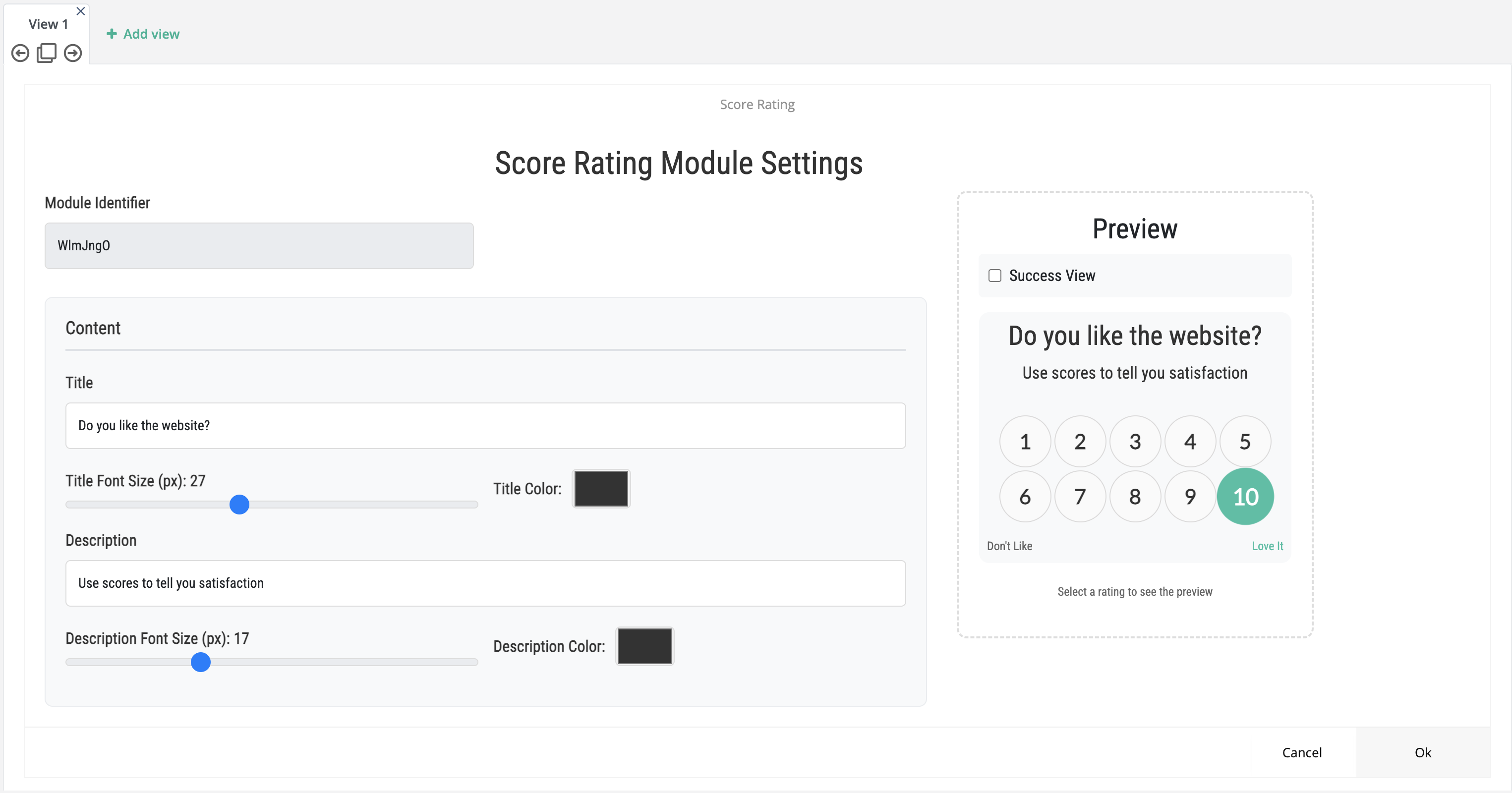
#### Fine-tune your score element's look and scale
Align scoring visuals with your brand more accurately.
You can now:
* Start the rating scale at **0** by setting **Min Rate = 0** (fully supported in both preview and live widget)
* Adjust the **Number (Font) Size** in pixels within defined limits
* Maintain proportional layout automatically with a **Circle Size** that scales according to the selected number size
No more workaround configurations, just consistent visual control.
[Fine-Tune Your Score Element's Look and Scale](/netmera-user-guide/omnichannel-engagement/widgets/build-a-widget/widget-elements-reference.md#score-rating)
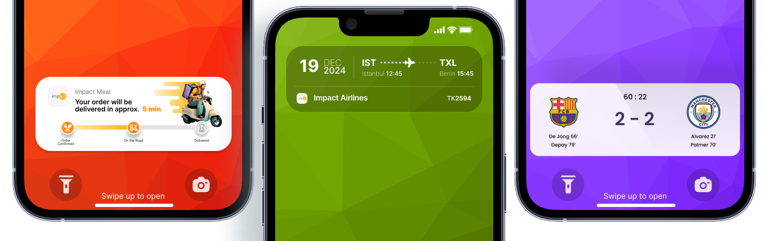
### Live Activities
#### Keep live activities timely and on-brand
Keep your Live Activities relevant, timely, and aligned with your campaign strategy.
You can now:
* Automatically end Live Activities at a planned time — perfect for flash sales, match days, limited offers, or time-bound campaigns
* Control how long completed activities remain visible on the Lock Screen
* Ensure outdated content is clearly marked if updates stop
**Why this matters**
This update helps you:
* Prevent expired promotions from staying visible
* Keep real-time experiences accurate and trustworthy
* Manage time-sensitive campaigns more confidently
[Keep Live Activities Timely and On-Brand](/netmera-user-guide/omnichannel-engagement/live-activities.md)
### Customer data
#### Turn user preferences into social proof
Turn user preferences into powerful social proof.
You can now:
* Instantly see how many users selected a specific preference (e.g., a favorite team or product)
* Use this count to display popularity indicators inside your app or campaigns
* Build dynamic experiences based on real user interest
**Why this matters**
This update enables you to:
* Highlight trending choices
* Strengthen engagement with “Most Popular” or “X people chose this” messaging
* Increase trust and conversion using real-time interest signals
Counts are near real-time and may update with a short delay (up to 2–3 hours).
This makes it easier to turn profile data into engagement-driving experiences — without accessing or exposing user-level data.
[Turn User Preferences into Social Proof](/netmera-user-guide/customer-data/profile-attributes.md)
### Journey
#### Measure journey conversions with precision
Measure conversions with greater clarity and control across your Journeys.
You can now:
* Define how long conversions should continue to be counted after a user exits a Journey
* Apply **1 Entry = 1 Conversion** logic to ensure each journey participation is counted only once
* Use built-in configuration checks and validation to set up conversion tracking correctly
**Why this matters**
These enhancements help you:
* Align conversion tracking with your campaign strategy
* Avoid inflated metrics caused by repeated user actions
* Analyze performance with greater confidence
Journey conversion reporting is now more structured, transparent, and easier to rely on for performance evaluation and optimization.
[Measure Journey Conversions with Precision](/netmera-user-guide/omnichannel-engagement/journey-orchestration/conversions-in-journey.md)
## January, 2026
### Dashboard & AI
#### Spot performance shifts faster with AI insights on your dashboard
Spot performance shifts faster, right from your dashboard.
You can now:
* View **AI Insights** directly on the App Dashboard to monitor user and engagement trends
* Click dashboard cards and metrics to drill down into detailed analytics
* Access channel-specific cards (Mobile, Web, SMS, Email, WhatsApp) alongside cross-channel insights
Card visibility may vary based on enabled modules, permissions, and available data.
[Spot Performance Shifts Faster with AI Insights on Your Dashboard](/netmera-user-guide/dashboard.md)
### WhatsApp
#### See your WhatsApp campaign performance end to end
Validate campaign performance end to end in a single view.
You can now:
* Monitor Netmera sends, Meta delivery statuses, and end-user reads together
* Use KPI cards to quickly assess delivery performance and investigate failures
* Track read trends over time
This makes WhatsApp reporting clearer and more actionable.
[See Your WhatsApp Campaign Performance End to End](/netmera-user-guide/omnichannel-engagement/whatsapp/whatsapp-reports.md)
### Analytics
#### Turn uninstall data into immediate re-engagement action
You can now:
* Take user-level actions directly from the Uninstall report (add to audience, tag, export)
* Export uninstall data with **External ID**, plus related campaign and journey/flow breakdown
* Use a consistent export experience across Analytics > Retention and Analytics > Cohort
This enables faster re-engagement and deeper churn analysis.
[Turn Uninstall Data into Immediate Re-Engagement Action](/netmera-user-guide/reports-and-analytics/analytics/user-and-audience/uninstall.md#review-the-uninstalled-users-list)
### Automated messaging
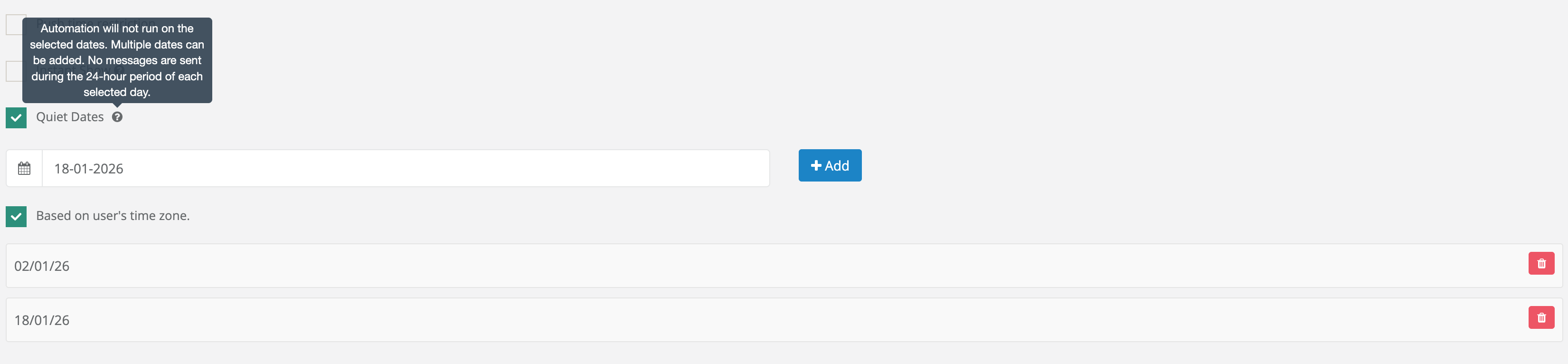
#### Pause automations on the days that matter
You can now:
* Define one or more **Quiet Dates** during Automated Scenario setup
* Automatically suppress scenario runs for a full 24-hour period
* Apply suppression based on time zone settings:
* If **User Time Zone** is enabled → suppression applies per user
* If disabled → suppression applies in project time zone
No manual intervention required.
[Pause Automations on the Days That Matter](/netmera-user-guide/messaging-features/automated-messaging.md#campaign-period)
### Exports
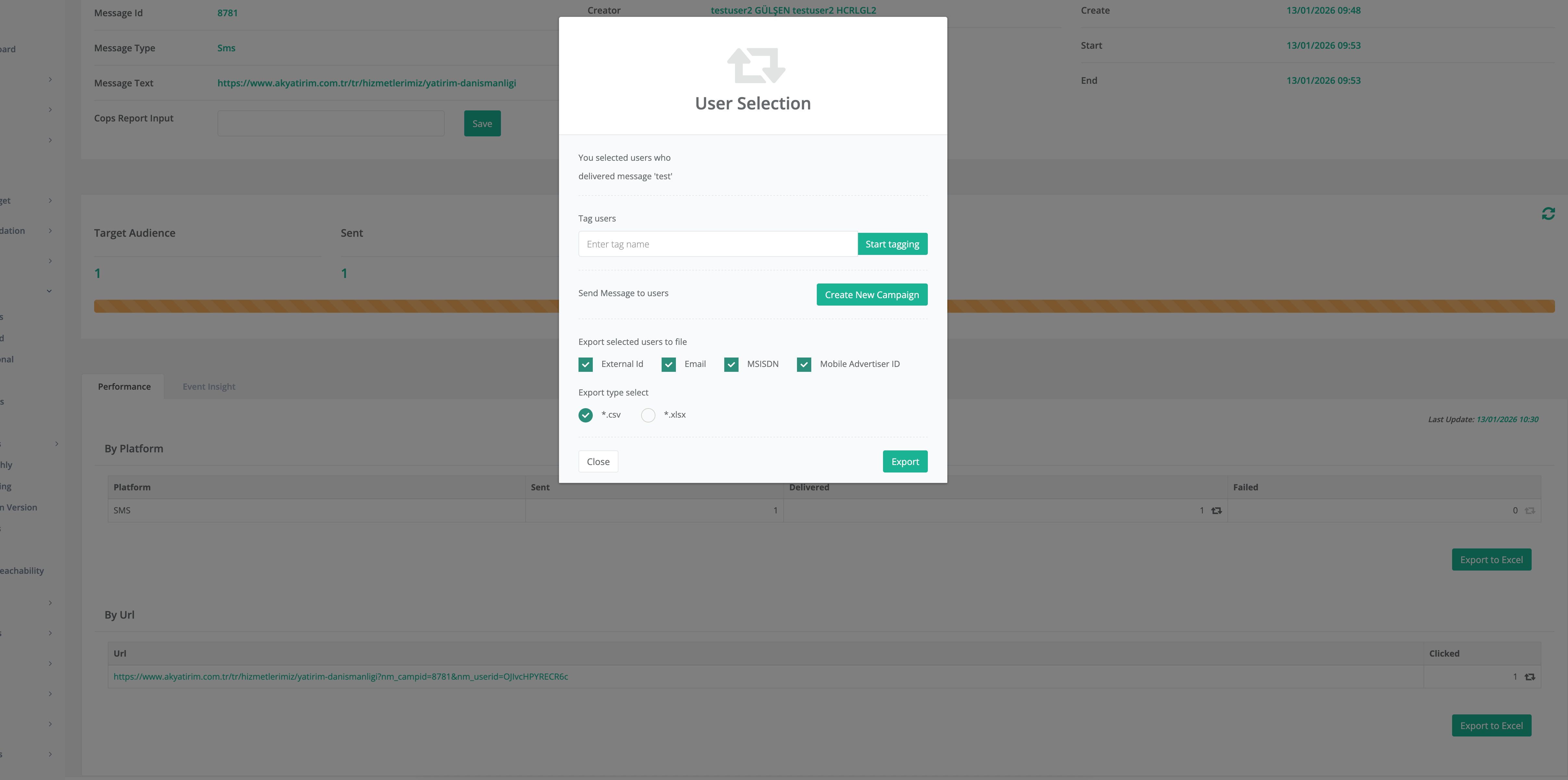
#### Export multiple identifiers in a single run
You can now:
* Select multiple identifiers in Export Selected Users to File
* Receive each identifier as a separate column
* View null values for missing identifiers
Available across Campaigns, Targeting, Reports, and Analytics export flows.
[Export Multiple Identifiers in a Single Run](/netmera-user-guide/targeting/export-users.md#step-1-identifier-selection-multi-select)
### Reports
#### Turn delivery failures into actionable insights
You can now:
* Include **Fail Reason** in report exports
* Access provider error codes and messages in a dedicated column
* Use this across Campaign, Automated, Transactional, and Geofence reports
Supported for SMS, Mobile Push, Web Push, and In-App notifications.
[Turn Delivery Failures into Actionable Insights](/netmera-user-guide/targeting/export-users.md#failed-users-export-campaign-reports)
### Targeting
#### Segment users by how many devices they use
You can now:
* Filter users by exact **Device Count**
* Choose platform scope (Mobile, Web, All)
* Take actions directly from the filtered results
This enables more flexible targeting and analysis strategies.
[Segment Users by How Many Devices They Use](/netmera-user-guide/targeting/people.md#select-people)
#### Monitor and manage blacklist status with precision
You can now:
* Use **Blacklist – Exists** to find users blacklisted in any channel
* Use **Blacklist – Equals** to filter by specific channel (Mobile, Web, SMS, Email, WhatsApp)
* Continue with standard People actions (view, export, audience operations)
This simplifies compliance monitoring and targeting control.
[Monitor and Manage Blacklist Status with Precision](/netmera-user-guide/targeting/people.md#engagement)
### Email
#### Build better segments with hard bounce date visibility
Improve bounce-based segmentation accuracy.
You can now:
* View **Hard Bounce Date** directly on the user profile
* Build more precise segments using bounce timing information
This enhances email hygiene and segmentation reliability.
[Build Better Segments with Hard Bounce Date Visibility](/netmera-user-guide/reports-and-analytics/reports/delivery/campaigns/email-reports.md#bounce-and-suppression-management)
---
# Agent Instructions
This documentation is published with GitBook. GitBook is the documentation platform designed so that both humans and AI agents can read, navigate, and reason over technical content effectively. Learn more at gitbook.com.
## Querying This Documentation
If you need additional information that is not directly available in this page, you can query the documentation by asking a question.
Perform an HTTP GET request on the following URL with the `ask` and `goal` query parameters:
```
GET https://user.netmera.com/netmera-user-guide/whats-new/2026.md?ask=&goal=
```
`ask` is the immediate question: it should be specific, self-contained, and written in natural language.
`goal` is what the user is ultimately trying to achieve, the reason they need the answer. Sharing it helps GitBook give you a better, more relevant answer. A goal is most helpful when it describes the outcome the user wants rather than restating the question. For example, with `ask=how do I create an API token`, a goal like `automate deployments from our CI pipeline` lets GitBook tailor the answer to that use case.
The response will contain a direct answer to the question and relevant excerpts and sources from the documentation.
Use this mechanism when the answer is not explicitly present in the current page, you need clarification or additional context, or you want to retrieve related documentation sections.