> For the complete documentation index, see [llms.txt](https://user.netmera.com/netmera-user-guide/llms.txt). Markdown versions of documentation pages are available by appending `.md` to page URLs; this page is available as [Markdown](https://user.netmera.com/netmera-user-guide/panel-settings/settings/messaging-and-content/message-categories.md).

# Message category settings

Define message categories by business purpose and channel so each user can opt in or unsubscribe per category, with targeting, reporting and API support.

**Path**: `Settings > Messaging & Content > Message Categories`

Message Categories define the **business purpose** of a campaign. They classify every message according to *why* it is sent, and they declare **which channels** that purpose applies to. Each user holds a separate opt-in state for every category + channel pair, so a user can accept a purpose on one channel and reject it on another. These states can be changed by the user through the Mobile SDK, or by the brand through the panel and the REST API.

Examples of categories:

* promotions
* order\_tracking
* security
* transactions
* announcements

A category can cover one channel or several. `order_tracking` can be defined for Mobile Push, Email, and SMS at the same time, while a category such as `sms_otp` can be restricted to SMS only.

Consent is stored per **category + channel**. A user who opts out of `promotions` on Mobile Push keeps receiving `promotions` on Email.

{% hint style="info" %}
Message Categories provide the technical structure for purpose- and channel-specific permissions. Your organization remains responsible for determining the consent model, lawful basis, and wording required by applicable regulations. The GDPR references on this page are for orientation and are not legal advice.
{% endhint %}

### Why Message Categories Are Important

#### 1. Purpose-Based Consent (Granular Permission Management)

Traditional communication models rely only on channel-based permission:

* Push: allowed / not allowed
* Email: allowed / not allowed

Modern privacy standards and user expectations require more granular control. Users may want to receive some types of communication while rejecting others, and they may want a different answer per channel.

<table><thead><tr><th width="220">Purpose</th><th>Mobile Push</th><th>Email</th><th>SMS</th></tr></thead><tbody><tr><td>Promotions</td><td>Opted out</td><td>Opted in</td><td>Opted out</td></tr><tr><td>Order Updates</td><td>Opted in</td><td>Opted in</td><td>Opted in</td></tr><tr><td>Security Alerts</td><td>Opted in</td><td>Opted in</td><td>Opted in</td></tr></tbody></table>

This is called **purpose-based consent**.

When a campaign is assigned a message category:

* Netmera checks whether the user has granted permission for that purpose **on the campaign's channel**.
* Delivery occurs only if both channel permission and purpose permission are valid.
* If the user has opted out of that category on that channel, the message is automatically blocked.

Without a category assignment, purpose-level enforcement cannot be applied.

#### 2. Compliance and Governance

Message Categories help ensure regulatory compliance and internal governance.

They:

* Separate marketing content from transactional or mandatory messages.
* Prevent accidental misuse of transactional channels for promotional content.
* Provide a clear audit trail of communication intent.
* Support compliance with regulations requiring explicit purpose limitation.

Each campaign must clearly define its purpose. This reduces ambiguity and operational risk.

### Delivery Logic: Channel + Purpose Model

Netmera evaluates message delivery in three steps:

1. **Channel permission**\
   Whether the user allows communication through the selected channel (Mobile Push, Email, SMS, WhatsApp, In-App, Web Push). If this is off, nothing is delivered, regardless of category preferences.
2. **Category + channel preference**\
   Whether the user allows communication for this specific purpose on this specific channel.
3. **Category default**\
   If no preference record exists for the category + channel pair, the category's **Subscription Type** decides the outcome.

Delivery occurs only when all applicable conditions are satisfied.

<table><thead><tr><th width="230">General channel permission</th><th width="230">Category + channel preference</th><th>Result</th></tr></thead><tbody><tr><td>ON</td><td>ON, or no record on an Opt-in category</td><td>Delivered</td></tr><tr><td>ON</td><td>No record on an Opt-out category</td><td>Blocked until the user opts in</td></tr><tr><td>ON</td><td>OFF</td><td>Blocked for this category only. Other categories on the same channel are unaffected.</td></tr><tr><td>OFF</td><td>ON</td><td>Blocked</td></tr><tr><td>OFF</td><td>OFF</td><td>Blocked</td></tr></tbody></table>

{% hint style="info" %}
Category-level unsubscribe never changes the general channel permission. If a user turns off Mobile Push for one category, the general Mobile Push permission stays on and every other push category keeps its own state. When the general permission is turned off and later back on, the stored category preferences still apply.
{% endhint %}

#### Channels and API values

The same six channels are available in the panel, the REST API, and the Mobile SDK.

| Panel channel | REST API / SDK value |
| ------------- | -------------------- |
| Mobile Push   | `MOBILE`             |
| Email         | `EMAIL`              |
| SMS           | `SMS`                |
| WhatsApp      | `WHATS_APP`          |
| In-App        | `IN_APP`             |
| Web Push      | `WEB`                |

For the complete consent setup, see [Granular Consent Management](/netmera-user-guide/customer-data/granular-consent-management.md).

### Create a Message Category

{% stepper %}
{% step %}

#### Open Message Categories

Go to **Settings > Message Categories**.

<figure><img src="https://1642824329-files.gitbook.io/~/files/v0/b/gitbook-x-prod.appspot.com/o/spaces%2FX6uilbEAw42gqsudlclY%2Fuploads%2FsFThEIX0544IgYYn0DZs%2FEkran%20Resmi%202026-09-16%2020.34.03.png?alt=media&#x26;token=c2db8fba-df11-401b-9548-4d0e3e62ccae" alt=""><figcaption></figcaption></figure>
{% endstep %}

{% step %}

#### Create and save

1. Click **Create**.
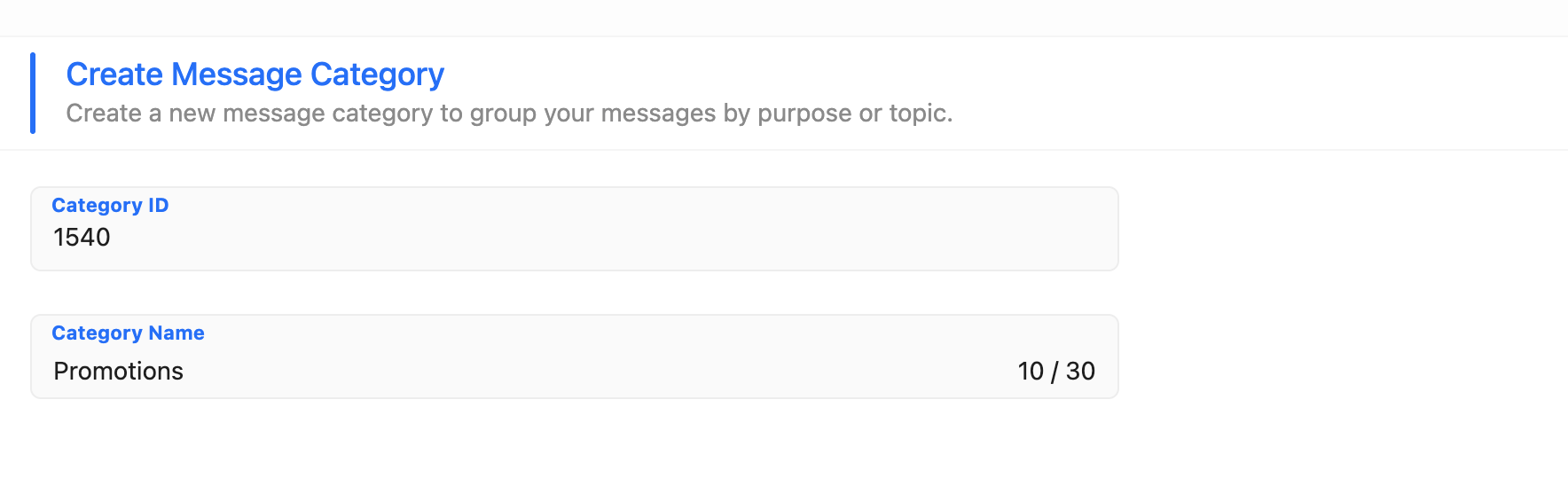
2. Fill in **Category ID** and **Category Name**.
3. Select the **Channels** the category applies to.
4. Select the **Subscription Type**.
5. Click **Save**.
   {% endstep %}
   {% endstepper %}

#### Field definitions

<figure><img src="https://1642824329-files.gitbook.io/~/files/v0/b/gitbook-x-prod.appspot.com/o/spaces%2FX6uilbEAw42gqsudlclY%2Fuploads%2F2VRPsbxBpBgCJDBSqqgs%2FEkran%20Resmi%202026-09-16%2020.34.39.png?alt=media&#x26;token=f62a7e6d-e579-4a39-a887-17c596838616" alt="" width="563"><figcaption></figcaption></figure>

**Category ID**

Stable key used in permission storage, reporting, and exports. The ID is **immutable**: once the category is created, it cannot be changed. Attempting to change it returns `Category ID cannot be changed after the category is created.`

**Category Name**

Human-readable name shown in the panel and used by the REST API. Names must be unique; a duplicate returns `Category name already exists.` Naming can be adjusted later without breaking analysis, as long as the ID stays stable.

**Channels**

The channels the category applies to. Available options:

<table><thead><tr><th width="220">Channel</th><th>Default state</th></tr></thead><tbody><tr><td>Mobile Push</td><td>ON</td></tr><tr><td>Email</td><td>ON</td></tr><tr><td>SMS</td><td>ON</td></tr><tr><td>WhatsApp</td><td>ON</td></tr><tr><td>In-App</td><td>ON</td></tr><tr><td>Web Push</td><td>ON</td></tr></tbody></table>

<figure><img src="https://1642824329-files.gitbook.io/~/files/v0/b/gitbook-x-prod.appspot.com/o/spaces%2FX6uilbEAw42gqsudlclY%2Fuploads%2FuoeSsnu5slFuX59CvLRc%2FEkran%20Resmi%202026-09-16%2020.35.06.png?alt=media&#x26;token=eb57b49e-c167-4cdb-945f-8db96d23463d" alt="" width="563"><figcaption></figcaption></figure>

* All channels are selected by default on a new category.
* Channels are selected independently. One or several can be active.
* **At least one channel is required.** If every channel is cleared, **Create** / **Save** is disabled and the field shows `At least one channel must be selected.`
* Channel selection can be changed later from the **Edit** screen.

**Subscription Type**

Determines what happens when a user has no preference record for the category on a given channel.

<figure><img src="https://1642824329-files.gitbook.io/~/files/v0/b/gitbook-x-prod.appspot.com/o/spaces%2FX6uilbEAw42gqsudlclY%2Fuploads%2Fvx5Buc7Z13YJLuuD8Dkt%2FEkran%20Resmi%202026-09-16%2020.35.15.png?alt=media&#x26;token=0e7748cb-f155-44d6-a072-f7c1260b381f" alt="" width="563"><figcaption></figcaption></figure>

<table><thead><tr><th width="180">Subscription Type</th><th width="230">Users with no record</th><th>What is stored</th></tr></thead><tbody><tr><td><strong>Opt-in</strong> (default)</td><td>Subscribed</td><td>Only the users who opted out</td></tr><tr><td><strong>Opt-out</strong></td><td>Not subscribed</td><td>Only the users who opted in</td></tr></tbody></table>

Use **Opt-in** for categories users are expected to receive by default, such as order tracking or security alerts. Use **Opt-out** for categories that require explicit consent before the first send.

{% hint style="warning" %}
Changing the Subscription Type of an existing category **clears all stored channel permissions** for that category. Previously recorded opt-in and opt-out states are lost, because their meaning is inverted. Deleting a category clears its permission data as well.
{% endhint %}

#### Best practices for Category ID

* Keep it **short** and **stable** (example: `promo`).
* Use a **purpose**, not a channel. A category can span channels; use the Channels field to scope it, not the ID.
* Prefer lowercase and avoid spaces (example: `order_tracking`).
* Don't change IDs after launch. The ID is immutable — create a new category instead.

<figure><img src="https://1642824329-files.gitbook.io/~/files/v0/b/gitbook-x-prod.appspot.com/o/spaces%2FX6uilbEAw42gqsudlclY%2Fuploads%2FlmnEDkUXOrj1KYDYIN1V%2FScreenshot%202026-02-19%20at%2012.06.56.png?alt=media&#x26;token=3add77cb-174b-4f62-b21f-12b2706d2694" alt=""><figcaption><p>Category ID and Name</p></figcaption></figure>

#### Recommended category structure

Don't create separate categories for the same purpose, such as `push_promo`, `sms_promo`, and `email_promo`. Use a single `promo` category and select the channels it applies to. Channel-level consent is stored under that single category, so users and reports see one purpose with a per-channel breakdown.

#### Categories created before channel selection

Categories created before channel selection was introduced carry no channel information. They are treated as valid on **all** channels for backward compatibility, and they appear in the Edit screen with every channel selected. No manual migration is required.

### Message Categories List

The list screen shows each category with its active channels and its per-channel audience.

**Channels column**

Displays the icons of the channels the category is active on.

**Per-channel user counts**

Opt-in Users and Opt-out Users are reported for each channel separately. There is no single category-level opt-in or opt-out figure, because a user can hold a different state on each channel.

<table><thead><tr><th width="150">Category Name</th><th width="140">Channels</th><th>Mobile Push Opt-in</th><th>Mobile Push Opt-out</th><th>Email Opt-in</th><th>Email Opt-out</th><th>SMS Opt-in</th><th>SMS Opt-out</th></tr></thead><tbody><tr><td>order_tracking</td><td>Push, Email</td><td>1,250</td><td>24</td><td>1,180</td><td>94</td><td>-</td><td>-</td></tr></tbody></table>

* Channels the category is not active on show `-` instead of a count.
* Counts reflect the resolved effective permission for the category + channel pair, including the category's Subscription Type default.
* Opt-in / Opt-out columns can be shown or hidden per channel. Hiding one channel's columns does not affect the others.

<figure><img src="https://1642824329-files.gitbook.io/~/files/v0/b/gitbook-x-prod.appspot.com/o/spaces%2FX6uilbEAw42gqsudlclY%2Fuploads%2FkYsGpYkgEEYx7nX4m0n6%2FEkran%20Resmi%202026-09-16%2020.35.47.png?alt=media&#x26;token=8e5aaa23-9d36-45c3-8b85-9a9ece28e870" alt="" width="563"><figcaption></figcaption></figure>

#### Example

A user opts out of the **Newsletter** category on Mobile Push and keeps Email permission.

<table><thead><tr><th width="220">Channel</th><th width="180">Opt-in Users</th><th>Opt-out Users</th></tr></thead><tbody><tr><td>Mobile Push</td><td>-1</td><td>+1</td></tr><tr><td>Email</td><td>No change</td><td>No change</td></tr><tr><td>SMS</td><td>No change</td><td>No change</td></tr><tr><td>WhatsApp</td><td>No change</td><td>No change</td></tr><tr><td>In-App</td><td>No change</td><td>No change</td></tr><tr><td>Web Push</td><td>No change</td><td>No change</td></tr></tbody></table>

The preference affects only the `Newsletter + Mobile Push` combination.

### Assign a Category to a Campaign

{% stepper %}
{% step %}

#### Go to the content step

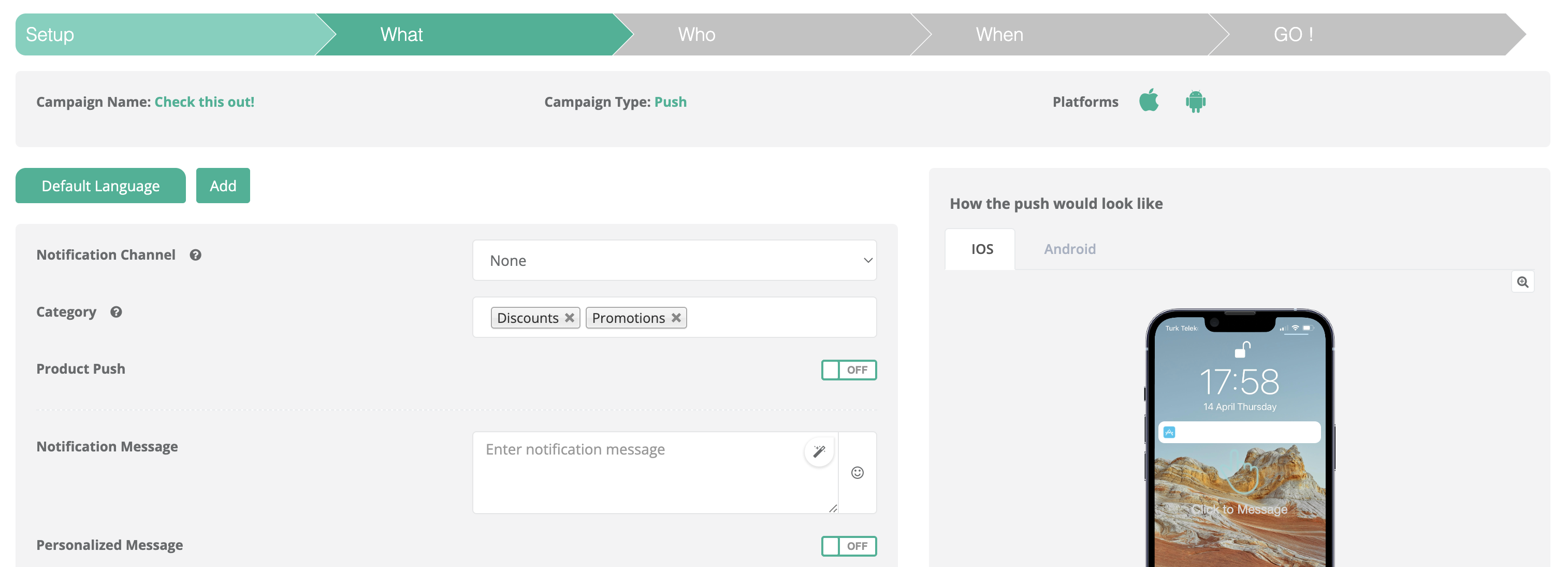
While creating a campaign, open **Step 2: What** (or the channel's equivalent "Content" step).
{% endstep %}

{% step %}

#### Select the category

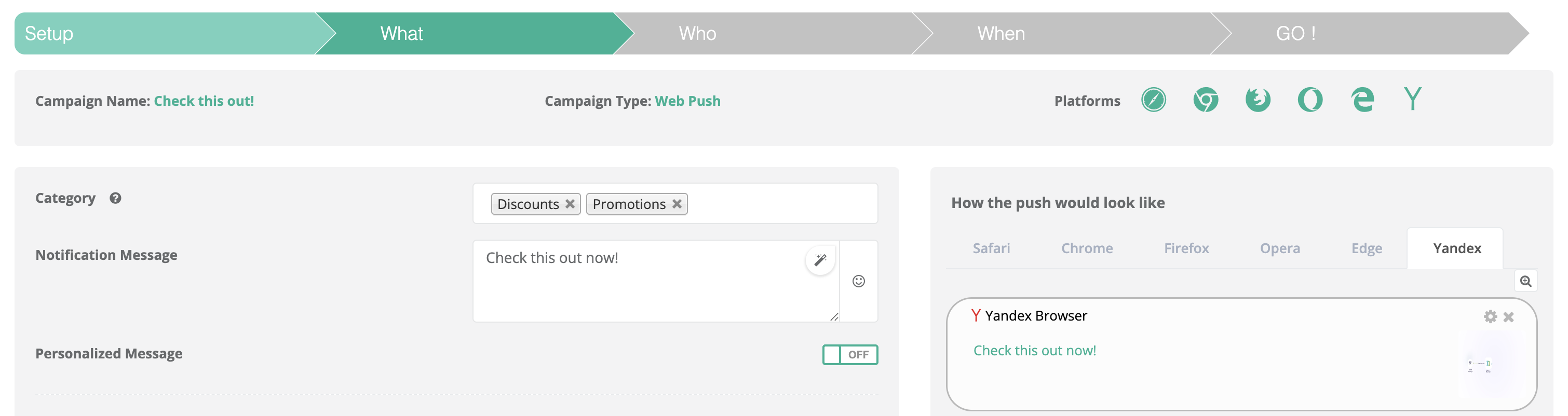
Pick the category that matches the campaign's purpose. The list shows only the categories that are active on the campaign's channel.
{% endstep %}
{% endstepper %}

<table><thead><tr><th width="191.4921875">Campaign channel</th><th>Categories listed</th></tr></thead><tbody><tr><td>Mobile Push</td><td>Categories with Mobile Push selected, plus legacy categories</td></tr><tr><td>Email</td><td>Categories with Email selected, plus legacy categories</td></tr><tr><td>SMS</td><td>Categories with SMS selected, plus legacy categories</td></tr><tr><td>WhatsApp</td><td>Categories with WhatsApp selected, plus legacy categories</td></tr><tr><td>In-App</td><td>Categories with In-App selected, plus legacy categories</td></tr><tr><td>Web Push</td><td>Categories with Web Push selected, plus legacy categories</td></tr></tbody></table>

<figure><img src="https://1642824329-files.gitbook.io/~/files/v0/b/gitbook-x-prod.appspot.com/o/spaces%2FX6uilbEAw42gqsudlclY%2Fuploads%2Fcsd65N8vyV20Sb4Ifxcm%2FScreenshot%202026-02-19%20at%2012.08.02.png?alt=media&#x26;token=decc21f4-2764-47e4-803c-0aa96bc8d4f1" alt=""><figcaption><p>Select a category in the campaign flow</p></figcaption></figure>

#### More examples (different channels)

<figure><img src="https://1642824329-files.gitbook.io/~/files/v0/b/gitbook-x-prod.appspot.com/o/spaces%2FX6uilbEAw42gqsudlclY%2Fuploads%2FjX0EchxRqth5uYz6AGmN%2FScreenshot%202026-02-19%20at%2012.09.28.png?alt=media&#x26;token=a7faaa3d-4745-4cf2-ba29-846964c39c84" alt=""><figcaption></figcaption></figure>

<figure><img src="https://1642824329-files.gitbook.io/~/files/v0/b/gitbook-x-prod.appspot.com/o/spaces%2FX6uilbEAw42gqsudlclY%2Fuploads%2FHrRqpnQKCyhhwv0RcnmP%2FScreenshot%202026-02-19%20at%2012.10.21.png?alt=media&#x26;token=fe99df27-d532-4938-8f39-eebc8cd9b5fe" alt=""><figcaption></figcaption></figure>

<figure><img src="https://1642824329-files.gitbook.io/~/files/v0/b/gitbook-x-prod.appspot.com/o/spaces%2FX6uilbEAw42gqsudlclY%2Fuploads%2FTjAcBS14xvbmImK608ej%2FScreenshot%202026-02-19%20at%2012.09.54.png?alt=media&#x26;token=f7061355-5a7f-477a-b12e-6af7951c0e9a" alt=""><figcaption></figcaption></figure>

{% hint style="warning" %}
If you don't assign a category, you can't reliably analyze campaigns by purpose. If you use purpose-based consent, Netmera can't enforce it without a category.
{% endhint %}

### Manage Category Permissions on a User

Category permissions are visible and editable per channel in **User Detail**.

Each category is listed with a toggle for Mobile Push, Email, SMS, WhatsApp, In-App, and Web Push:

<table><thead><tr><th width="126.0546875">Category</th><th>Mobile Push</th><th>Email</th><th>SMS</th><th>WhatsApp</th><th>In-App</th><th>Web Push</th></tr></thead><tbody><tr><td>Category X</td><td>Toggle</td><td>Toggle</td><td>Disabled</td><td>Disabled</td><td>Disabled</td><td>Disabled</td></tr></tbody></table>

* Only the channels the category is defined for are editable. The remaining toggles are disabled and produce no permission record.

<figure><img src="https://1642824329-files.gitbook.io/~/files/v0/b/gitbook-x-prod.appspot.com/o/spaces%2FX6uilbEAw42gqsudlclY%2Fuploads%2FMapTcBfCFxIy3YLtXJ0G%2FEkran%20Resmi%202026-09-16%2020.37.43.png?alt=media&#x26;token=af18e295-bdf2-479f-a571-5c05e02a9bdf" alt="" width="563"><figcaption></figcaption></figure>

* A toggle with no stored preference reflects the category's Subscription Type: ON for opt-in categories, OFF for opt-out categories.
* Legacy categories show every channel toggle as editable.
* Changing a toggle updates only that category + channel pair. It does not change the user's general channel permission, the category's other channels, or the user's preferences in other categories.

<figure><img src="https://1642824329-files.gitbook.io/~/files/v0/b/gitbook-x-prod.appspot.com/o/spaces%2FX6uilbEAw42gqsudlclY%2Fuploads%2F3VINDejmI3J2axNseMSM%2FEkran%20Resmi%202026-09-16%2020.37.11.png?alt=media&#x26;token=a571a6ca-67d7-4862-804f-d5c00d5162a7" alt="" width="563"><figcaption></figcaption></figure>

User Detail cannot change which channels a category is defined for. That definition lives in **Settings > Message Categories**.

### Target Users by Category Permission

Under **Targeting > Find People**, the **By Category Permission** condition accepts a channel selection alongside the category.

* Select one or more channels to evaluate permission only on those channels.
* Leave the channel selection empty to evaluate against the campaign's channel, or — with no campaign context — against the category's own channels.

For audience counting, reachability is based on whether the user has the identifier or token required by the channel (email address, phone number, or a registered mobile or web device).

<figure><img src="https://1642824329-files.gitbook.io/~/files/v0/b/gitbook-x-prod.appspot.com/o/spaces%2FX6uilbEAw42gqsudlclY%2Fuploads%2FVMQH2DcMQ6AWVOhpTgW0%2FEkran%20Resmi%202026-09-16%2020.39.16.png?alt=media&#x26;token=7ccc66b4-e458-4cc2-91f2-c8061da3491a" alt=""><figcaption></figcaption></figure>

<figure><img src="https://1642824329-files.gitbook.io/~/files/v0/b/gitbook-x-prod.appspot.com/o/spaces%2FX6uilbEAw42gqsudlclY%2Fuploads%2FpHiHsve1POwSfrqoejeF%2FEkran%20Resmi%202026-09-16%2020.39.27.png?alt=media&#x26;token=5d4b6754-19b7-4e01-9d24-74a86102e6c5" alt=""><figcaption></figcaption></figure>

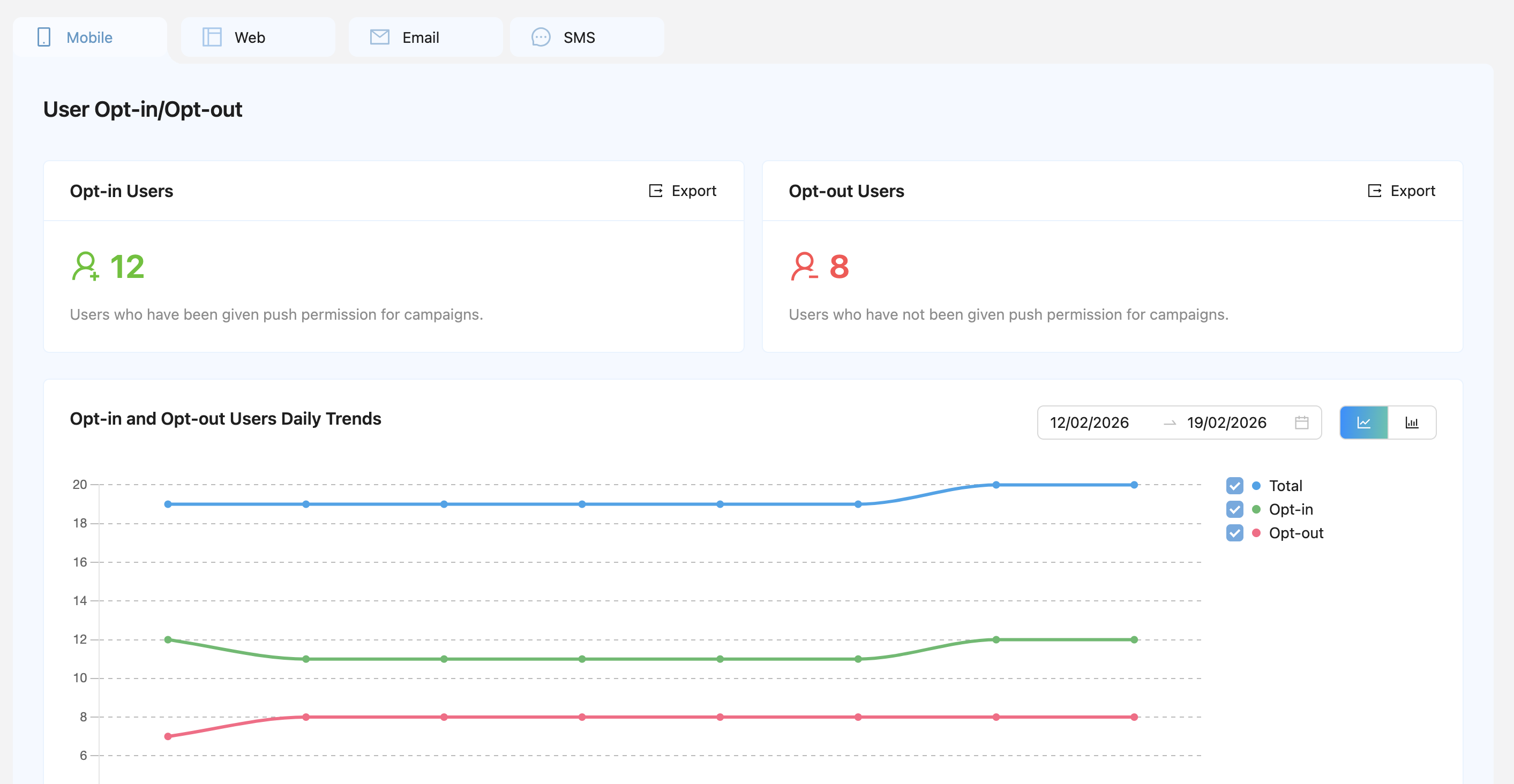
### Purpose-Based Reporting and Analytics

Message Categories enable reporting by business intent rather than by channel alone. Channel Reachability reports show how many users are reachable per purpose, broken down by channel:

* promotions
* order\_tracking
* security

Without category assignment, this level of analysis is not reliable.

* [Channel Reachability](/netmera-user-guide/reports-and-analytics/reports/audience-and-growth/channel-reachability.md)

<figure><img src="https://1642824329-files.gitbook.io/~/files/v0/b/gitbook-x-prod.appspot.com/o/spaces%2FX6uilbEAw42gqsudlclY%2Fuploads%2FzJiNjFnrIGuYMChiTArP%2FEkran%20Resmi%202026-09-16%2020.40.09.png?alt=media&#x26;token=c32dcaee-0dd2-4296-8cda-2319fe859a5d" alt=""><figcaption></figcaption></figure>

<figure><img src="https://1642824329-files.gitbook.io/~/files/v0/b/gitbook-x-prod.appspot.com/o/spaces%2FX6uilbEAw42gqsudlclY%2Fuploads%2FG4Hc91e6OiVdGHv3cLyq%2FScreenshot%202026-02-19%20at%2012.11.24.png?alt=media&#x26;token=557a5328-1c86-4c95-97b8-bd668648b954" alt=""><figcaption></figcaption></figure>

### REST API and SDK Overview

Message Categories are available outside the panel through two integration layers. The **REST API** is used from your backend to list categories, assign them to notifications sent by API, and read or update a user's category preferences. The **Mobile SDK** is used inside your app to show users their category preferences and let them change them, for example in a preference center or notification settings screen.

#### REST API

<table><thead><tr><th width="261.40625">Endpoint</th><th>What it does</th><th>Developer Guide</th></tr></thead><tbody><tr><td><code>GET /rest/3.0/getPushCategories</code></td><td>Lists the categories defined under <strong>Settings > Message Categories</strong>. The returned names and IDs are used by the other endpoints.</td><td><a href="https://user.netmera.com/netmera-developer-guide/api-documentation/rest-api/notifications#push-categories">Push Categories</a></td></tr><tr><td><code>POST /rest/3.0/setCategoryPreferences</code></td><td>Opts a user in or out of a category, for all channels or for one channel with <code>channel</code>.</td><td><a href="https://user.netmera.com/netmera-developer-guide/api-documentation/rest-api/user-and-device-management#category-preferences">Category Preferences</a></td></tr><tr><td><code>GET /rest/3.0/getCategoryPreferences</code></td><td>Returns a user's category preferences with a per-channel breakdown. Can be filtered with <code>categoryIds</code> and <code>channels</code>.</td><td><a href="https://user.netmera.com/netmera-developer-guide/api-documentation/rest-api/user-and-device-management#category-preferences">Category Preferences</a></td></tr><tr><td><code>POST /rest/3.0/sendBulkNotification</code></td><td>Assigns one or more categories to a notification sent by API through the <code>categories</code> field.</td><td><a href="https://user.netmera.com/netmera-developer-guide/api-documentation/rest-api/notifications#send-notification-with-category">Send Notification with Category</a></td></tr><tr><td><code>POST /rest/3.0/createNotificationDefinition</code></td><td>Assigns categories to a transactional notification definition through the <code>categories</code> field.</td><td><a href="https://user.netmera.com/netmera-developer-guide/api-documentation/rest-api/notifications">Notifications</a></td></tr></tbody></table>

#### Mobile SDK

<table><thead><tr><th width="140.71484375">Platform</th><th>Methods</th><th>What they do</th><th>Developer Guide</th></tr></thead><tbody><tr><td>Android</td><td><code>getUserCategoryPreferenceList</code>, <code>setUserCategoryPreference</code></td><td>Read and update the user's category preferences. Channel-level read and write with <code>NMCategoryPreferenceFilter</code>, <code>NMCategoryPreferenceUpdate</code>, and <code>NMCategoryChannel</code> (4.21.0+).</td><td><a href="https://user.netmera.com/netmera-developer-guide/platforms/android/push-inbox#message-categories">Android — Message Categories</a></td></tr><tr><td>iOS (Swift)</td><td><code>getUserCategoryPreferenceList</code>, <code>setUserCategoryPreference</code></td><td>Read and update the user's category preferences. Channel-level read and write with <code>categoryIds</code>, <code>channels</code>, and <code>channel</code> parameters (4.26.0+).</td><td><a href="https://user.netmera.com/netmera-developer-guide/platforms/ios/new-ios-swift/push-inbox#manage-push-notification-categories">iOS — Manage Push Notification Categories</a></td></tr><tr><td>iOS (Objective-C)</td><td><code>getUserCategoryPreferenceList</code>, <code>setUserCategoryPreferenceWithCategoryId</code></td><td>Read and update the user's category preferences at category level.</td><td><a href="https://user.netmera.com/netmera-developer-guide/platforms/ios/former-ios-objective-c/push-inbox#message-category">iOS (Objective-C) — Message Category</a></td></tr><tr><td>Flutter</td><td><code>getUserCategoryPreferenceList</code>, <code>setUserCategoryPreference</code></td><td>Read and update the user's category preferences at category level.</td><td><a href="https://user.netmera.com/netmera-developer-guide/platforms/flutter/push-inbox">Flutter — Push Inbox</a></td></tr></tbody></table>

On Android and iOS, the Push Inbox filter (`NetmeraInboxFilter`) also accepts category names, so an in-app inbox can list messages by purpose.

{% hint style="info" %}
Detailed parameters, request and response models, and error handling are documented in the [Netmera Developer Guide](https://user.netmera.com/netmera-developer-guide/). The section below summarizes channel-based preference management and its use cases.
{% endhint %}

### Manage Category Permissions Through SDK and REST API

Category + channel preferences are not limited to the panel. The same records can be read and written from the Mobile SDK and the REST API, so the consent state follows the user wherever the decision is made — inside the app, in your backend systems, or by your operations team — while Netmera keeps a single, enforceable record.

<table><thead><tr><th width="155.37109375">Source</th><th>Who changes the preference</th><th>Typical trigger</th></tr></thead><tbody><tr><td><strong>Mobile SDK</strong></td><td>The user</td><td>In-app preference center or notification settings screen</td></tr><tr><td><strong>REST API</strong></td><td>The brand, on the user's behalf</td><td>CRM or consent-management platform sync, web preference center, email unsubscribe page, SMS keyword reply, call center request</td></tr><tr><td><strong>Panel</strong></td><td>The brand</td><td>Manual correction or support request in <strong>User Detail</strong></td></tr></tbody></table>

The channel parameter is **optional** in every category preference method:

* **Without a channel** — the call applies to all channels of the category, matching the behavior in place before channel selection. Existing integrations keep working without changes.
* **With a channel** — the call applies only to that category + channel pair.

Responses keep their existing category-level field and add a channel breakdown alongside it, so an older integration reads the same value it read before.

#### Mobile SDK

The per-channel category preference methods require the following native SDK versions (released September 17, 2026):

<table><thead><tr><th width="154.265625">Platform</th><th>Minimum version</th><th>Get preferences</th><th>Update preferences</th></tr></thead><tbody><tr><td>Android</td><td><strong>4.21.0</strong></td><td><code>Netmera.getUserCategoryPreferenceList(filter, callback)</code> with <code>NMCategoryPreferenceFilter</code></td><td><code>Netmera.setUserCategoryPreference(NMCategoryPreferenceUpdate, callback)</code></td></tr><tr><td>iOS (Swift)</td><td><strong>4.26.0</strong></td><td><code>Netmera.getUserCategoryPreferenceList(categoryIds:channels:)</code></td><td><code>Netmera.setUserCategoryPreference(categoryId:categoryEnabled:channel:)</code></td></tr></tbody></table>

* The aggregate status (`optInStatus` on Android, `categoryEnabled` on iOS) is `true` when the category is enabled on **any** channel. Use the per-channel breakdown (`channelPreferences`) to render channel toggles.
* On Android, `Netmera.setUserCategoryPreference(categoryId, categoryEnabled, listener)` is deprecated and behaves like the new method without a channel.

See the Developer Guide for full reference: [Android — Message Categories](https://user.netmera.com/netmera-developer-guide/platforms/android/push-inbox#message-categories) and [iOS — Manage Push Notification Categories](https://user.netmera.com/netmera-developer-guide/platforms/ios/new-ios-swift/push-inbox#manage-push-notification-categories).

#### REST API

| Endpoint                                | Purpose                                         | Channel parameter                  |
| --------------------------------------- | ----------------------------------------------- | ---------------------------------- |
| `POST /rest/3.0/setCategoryPreferences` | Opt a user in or out of a category              | `channel` (optional, per entry)    |
| `GET /rest/3.0/getCategoryPreferences`  | Read a user's category preferences              | `channels` (optional, list filter) |
| `GET /rest/3.0/getPushCategories`       | List the categories defined for the application | —                                  |

* `categoryPreferences` is kept for backward compatibility and is `true` when the user is permitted on any of the category's channels. The `channels` filter does not affect it.
* `categoryChannelPreferences` returns the per-channel state. Use it for channel-level decisions.
* An entry with an unrecognized `channel` value is skipped and logged; the remaining entries are processed. A typo leaves that preference unchanged instead of updating every channel.

See the [Developer Guide — Category Preferences](https://user.netmera.com/netmera-developer-guide/api-documentation/rest-api/user-and-device-management#category-preferences) for all parameters.

### Use Cases

The following scenarios show how channel-based category consent supports common business and compliance requirements.

#### 1. In-app preference center

A retail app shows a settings screen with a row per category and a toggle per channel. The user keeps **Promotions** on Email, turns it off on Mobile Push and SMS, and keeps **Order Updates** on every channel.

* **Implementation:** `getUserCategoryPreferenceList` with `channelPreferences` to render the screen; `setUserCategoryPreference` with `channel` for each toggle.
* **Result:** Promotional push and SMS campaigns skip the user; promotional emails and all order updates are still delivered.
* **GDPR reference:** Art. 7(3) — withdrawing consent must be as easy as giving it. Recital 43 — separate consent for different processing operations.

#### 2. Channel-specific unsubscribe from an email or SMS

A user clicks the unsubscribe link in a promotional email, or replies with an opt-out keyword to a promotional SMS. The user objects to that message type on that channel, not to all communication.

* **Implementation:** Your unsubscribe page or SMS keyword handler calls `setCategoryPreferences` with `"channel": "EMAIL"` or `"channel": "SMS"` and `"enable": false`.
* **Result:** Only `promo` + Email (or `promo` + SMS) is turned off. Promotional push, order tracking, and security messages continue as consented.
* **GDPR reference:** Art. 21(2)–(3) — right to object to direct marketing at any time; once exercised, the data must no longer be processed for that purpose. Art. 7(3) — withdrawal of consent.

#### 3. Consent collected in another system (CRM, CMP, web, call center)

Consent is captured outside the app — during web registration, in a consent-management platform, or by a call center agent — and Netmera must reflect it.

* **Implementation:** Your backend syncs changes with `setCategoryPreferences`, sending one entry per category + channel pair. Use `getCategoryPreferences` to reconcile states.
* **Result:** Netmera enforces the same decision the user gave elsewhere, without waiting for an app session.
* **GDPR reference:** Art. 7(1) — the controller must be able to demonstrate consent; keeping one enforceable record per purpose and channel supports this. Art. 5(1)(d) — accuracy.

#### 4. Explicit consent before the first marketing message

Some markets or internal policies require that no marketing message is sent until the user explicitly agrees.

* **Implementation:** Create the marketing category with Subscription Type **Opt-out**. Users without a record are not subscribed. Write an opt-in record only after the user agrees on a given channel.
* **Result:** New users receive no marketing on any channel until they opt in on that channel.
* **GDPR reference:** Art. 4(11) and Art. 6(1)(a) — consent must be a clear affirmative act. Art. 25(2) — data protection by default. ePrivacy Directive Art. 13 — prior consent for electronic direct marketing.

#### 5. Keeping service messages separate from marketing

A user opts out of every promotional channel but must still receive order and security notifications.

* **Implementation:** Keep `order_tracking` and `security` as separate categories from `promo`, and assign them to their campaigns.
* **Result:** A marketing opt-out never blocks service messages, and service channels cannot be reused for promotional content without a visible category mismatch.
* **GDPR reference:** Art. 5(1)(b) — purpose limitation. Art. 7(2) — a consent request must be clearly distinguishable from other matters. Recital 32 — consent should cover all purposes; when processing has multiple purposes, consent should be given for each of them.

#### 6. Purpose-limited SMS categories

An OTP category is defined for SMS only.

* **Implementation:** Create `sms_otp` with only SMS selected. It does not appear in other channels' campaign editors, and no preference records can be created for it on other channels.
* **Result:** The purpose is restricted to the channel it was collected for.
* **GDPR reference:** Art. 5(1)(b) — purpose limitation; Art. 5(1)(c) — data minimisation.

### GDPR Reference Summary

<table><thead><tr><th width="161.125">Article</th><th>Principle</th><th>How Message Categories support it</th></tr></thead><tbody><tr><td>Art. 4(11)</td><td>Consent is specific, informed, and unambiguous</td><td>Each category + channel pair is a separate, specific decision</td></tr><tr><td>Art. 5(1)(b)</td><td>Purpose limitation</td><td>Categories represent purposes; campaigns must declare one</td></tr><tr><td>Art. 5(1)(c)</td><td>Data minimisation</td><td>Categories can be restricted to the channels the purpose needs</td></tr><tr><td>Art. 5(1)(d)</td><td>Accuracy</td><td>REST and SDK keep the Netmera record aligned with decisions made in other systems</td></tr><tr><td>Art. 6(1)(a)</td><td>Consent as a lawful basis</td><td>Opt-out Subscription Type prevents sending before an explicit opt-in</td></tr><tr><td>Art. 7(1)</td><td>Ability to demonstrate consent</td><td>Per-channel states are visible in User Detail and retrievable through <code>getCategoryPreferences</code></td></tr><tr><td>Art. 7(2)</td><td>Consent request clearly distinguishable</td><td>Separate categories for marketing and service messages</td></tr><tr><td>Art. 7(3)</td><td>Withdrawal as easy as giving consent</td><td>One toggle or one API call withdraws consent for a single purpose on a single channel</td></tr><tr><td>Art. 21(2)–(3)</td><td>Right to object to direct marketing</td><td>A marketing opt-out on a channel is enforced on the next send</td></tr><tr><td>Art. 25(2)</td><td>Data protection by default</td><td>Opt-out Subscription Type defaults new users to not subscribed</td></tr><tr><td>Recital 32, 43</td><td>Consent per purpose; separate consent for separate operations</td><td>Consent is stored per category and per channel</td></tr></tbody></table>

{% hint style="warning" %}
In Türkiye, commercial electronic messages over SMS, email, and calls are also subject to İYS. İYS consent and Message Category preferences manage different permissions; configure both. See [İYS Permissions](/netmera-user-guide/customer-data/iys-permissions.md).
{% endhint %}

### Summary

Message Categories are a structural foundation for:

* Granular consent enforcement, per purpose and per channel
* Compliance with purpose limitation principles
* Clean campaign classification
* Reliable reporting by business intent

They are not optional labels. They are a core part of how Netmera manages responsible and measurable communication.

### Related Pages

* [Granular Consent Management](/netmera-user-guide/customer-data/granular-consent-management.md)
* [İYS Permissions](/netmera-user-guide/customer-data/iys-permissions.md)
* [Channel Reachability](/netmera-user-guide/reports-and-analytics/reports/audience-and-growth/channel-reachability.md)
* [People](/netmera-user-guide/targeting/people.md)
* [Developer Guide — REST API Category Preferences](https://user.netmera.com/netmera-developer-guide/api-documentation/rest-api/user-and-device-management#category-preferences)
* [Developer Guide — Android Message Categories](https://user.netmera.com/netmera-developer-guide/platforms/android/push-inbox#message-categories)
* [Developer Guide — iOS Message Categories](https://user.netmera.com/netmera-developer-guide/platforms/ios/new-ios-swift/push-inbox#manage-push-notification-categories)


---

# Agent Instructions
This documentation is published with GitBook. GitBook is the documentation platform designed so that both humans and AI agents can read, navigate, and reason over technical content effectively. Learn more at gitbook.com.

## Querying This Documentation
If you need additional information that is not directly available in this page, you can query the documentation by asking a question.

Perform an HTTP GET request on the following URL with the `ask` and `goal` query parameters:

```
GET https://user.netmera.com/netmera-user-guide/panel-settings/settings/messaging-and-content/message-categories.md?ask=<question>&goal=<user_goal>
```

`ask` is the immediate question: it should be specific, self-contained, and written in natural language.
`goal` is what the user is ultimately trying to achieve, the reason they need the answer. Sharing it helps GitBook give you a better, more relevant answer. A goal is most helpful when it describes the outcome the user wants rather than restating the question. For example, with `ask=how do I create an API token`, a goal like `automate deployments from our CI pipeline` lets GitBook tailor the answer to that use case.

The response will contain a direct answer to the question and relevant excerpts and sources from the documentation.

Use this mechanism when the answer is not explicitly present in the current page, you need clarification or additional context, or you want to retrieve related documentation sections.