> For the complete documentation index, see [llms.txt](https://user.netmera.com/netmera-user-guide/llms.txt). Markdown versions of documentation pages are available by appending `.md` to page URLs; this page is available as [Markdown](https://user.netmera.com/netmera-user-guide/omnichannel-engagement/widgets/measure-performance/analyze-widget-performance.md).

# Analyze widget performance

Widget events measure delivery and engagement across mobile and web. Use **Analysis → Event Insight** to review standard and custom events.

{% hint style="success" %}
Events appear only after a widget triggers them and a user event occurs.
{% endhint %}

### Standard widget events

<table><thead><tr><th>Mobile</th><th width="250.70703125">Web</th><th>What it records</th></tr></thead><tbody><tr><td>Widget Shown Mobile</td><td>Widget Shown Web</td><td>The widget displays without an eligible interaction.</td></tr><tr><td>Widget Action Mobile</td><td>Widget Action Web</td><td>An eligible interaction with a configured link or deeplink.</td></tr><tr><td>Spin To Win Shown</td><td>Spin To Win Shown</td><td>The Spin to Win widget displays.</td></tr><tr><td>Spin Button Clicked</td><td>Spin Button Clicked</td><td>The user starts the spin.</td></tr><tr><td>Coupon Code Assigned</td><td>Coupon Code Assigned</td><td>The user receives a coupon code.</td></tr><tr><td>Coupon Code Assigned Failed</td><td>Coupon Code Assigned Failed</td><td>Coupon assignment fails.</td></tr><tr><td>Coupon Code Copied</td><td>Coupon Code Copied</td><td>The user copies the assigned coupon code.</td></tr></tbody></table>

### Review standard events

1. Go to **Analysis → Event Insight**.
2. Select the mobile or web event you want to analyze.
3. Choose dimensions such as time, user type, or device.

<figure><img src="/files/zH5YpalY4yurRn3kwSDG" alt="Widget events in Event Insight"><figcaption><p>Select an event, then choose dimensions for the analysis.</p></figcaption></figure>

### Action tracking requirements

A standard widget action requires one tracked image or button with one link or deeplink. This supports automatic action attribution.

{% hint style="warning" %}
Use [custom widget events](/netmera-user-guide/omnichannel-engagement/widgets/measure-performance/track-custom-widget-events.md) when you need to measure multiple interactions or business-specific behavior.
{% endhint %}

Eligible actions include:

* Clicking an image that opens a product page.
* Selecting a button that opens a section in the app or website.
* Tapping a promotional button that opens an offer or coupon code.

### Mobile widget events

#### Widget Shown Mobile

This event records when a user sees the widget without clicking or navigating from it. This includes users who close the widget with the **X** button or use a dismiss button without a link.

<figure><img src="/files/fsi2nv2SBkwku3bUwyGg" alt="Widget Shown Mobile event"><figcaption><p>Widget Shown Mobile measures views without an eligible action.</p></figcaption></figure>

#### Widget Action Mobile

This event records an eligible interaction with an image or button that contains a link or deeplink.

<figure><img src="/files/lzIrzYb64WO8mcgublFT" alt="Widget Action Mobile event"><figcaption><p>Widget Action Mobile measures eligible linked interactions.</p></figcaption></figure>

### Web widget events

#### Widget Shown Web

This event records when a user sees the widget without clicking or navigating from it. This includes users who close the widget with the **X** button or use a dismiss button without a link.

<figure><img src="/files/m5iBGqxXSvgzOo0ZzazZ" alt="Widget Shown Web event"><figcaption><p>Widget Shown Web measures views without an eligible action.</p></figcaption></figure>

#### Widget Action Web

This event records an eligible interaction with an image or button that contains a link or deeplink.

<figure><img src="/files/IEGxKmiHlNIbK8Vz1Y2w" alt="Widget Action Web event"><figcaption><p>Widget Action Web measures eligible linked interactions.</p></figcaption></figure>

### Spin to Win events

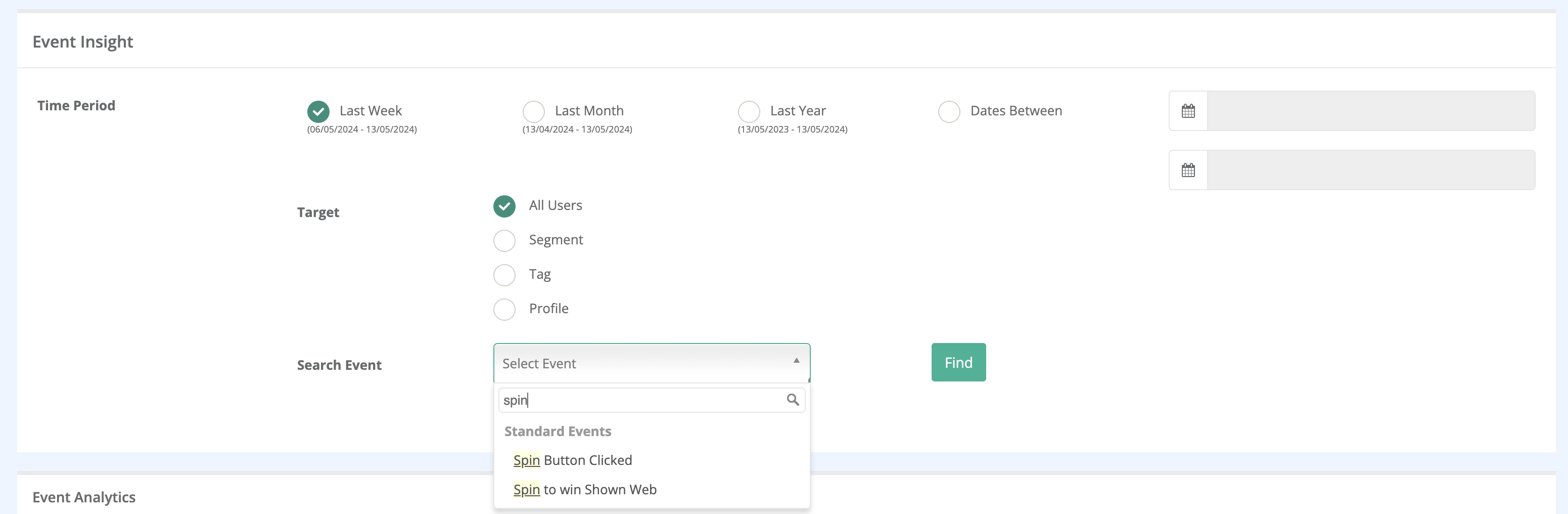
Use **Analysis → Event Insight** to review Spin to Win activity. For the full reward event guide, see [Analyze Spin to Win performance](broken://spaces/X6uilbEAw42gqsudlclY/pages/QRXkZKVY1Zmvq3iBk4O1).

* **Spin To Win Shown**: the Spin to Win widget displays.
* **Spin Button Clicked**: the user starts the spin.
* **Coupon Code Assigned**: the user receives a coupon code.
* **Coupon Code Assigned Failed**: coupon assignment fails after the spin.
* **Coupon Code Copied**: the user copies the assigned coupon code.

<figure><img src="/files/iGllFKOgVcS8YHWeWa6B" alt="Spin to Win events in Event Insight"><figcaption><p>Use the listed Spin to Win events to analyze the reward flow.</p></figcaption></figure>


---

# Agent Instructions
This documentation is published with GitBook. GitBook is the documentation platform designed so that both humans and AI agents can read, navigate, and reason over technical content effectively. Learn more at gitbook.com.

## Querying This Documentation
If you need additional information that is not directly available in this page, you can query the documentation dynamically by asking a question.

Perform an HTTP GET request on the current page URL with the `ask` query parameter, and the optional `goal` query parameter:

```
GET https://user.netmera.com/netmera-user-guide/omnichannel-engagement/widgets/measure-performance/analyze-widget-performance.md?ask=<question>&goal=<endgoal>
```

`ask` is the immediate question: it should be specific, self-contained, and written in natural language.
`goal` is optional and describes the broader end goal you are ultimately trying to accomplish on behalf of the user. GitBook uses it to tailor the answer towards what is most useful for that goal.

The response will contain a direct answer to the question and relevant excerpts and sources from the documentation.

Use this mechanism when the answer is not explicitly present in the current page, you need clarification or additional context, or you want to retrieve related documentation sections.