# Elements of Push Notifications

<figure><img src="https://1642824329-files.gitbook.io/~/files/v0/b/gitbook-x-prod.appspot.com/o/spaces%2FX6uilbEAw42gqsudlclY%2Fuploads%2FndrcIiUT8gMUAbOWl72H%2Fimage.png?alt=media&#x26;token=a0c06376-c138-4915-be68-f8d572005edf" alt=""><figcaption><p>Elements of Push Notifications</p></figcaption></figure>

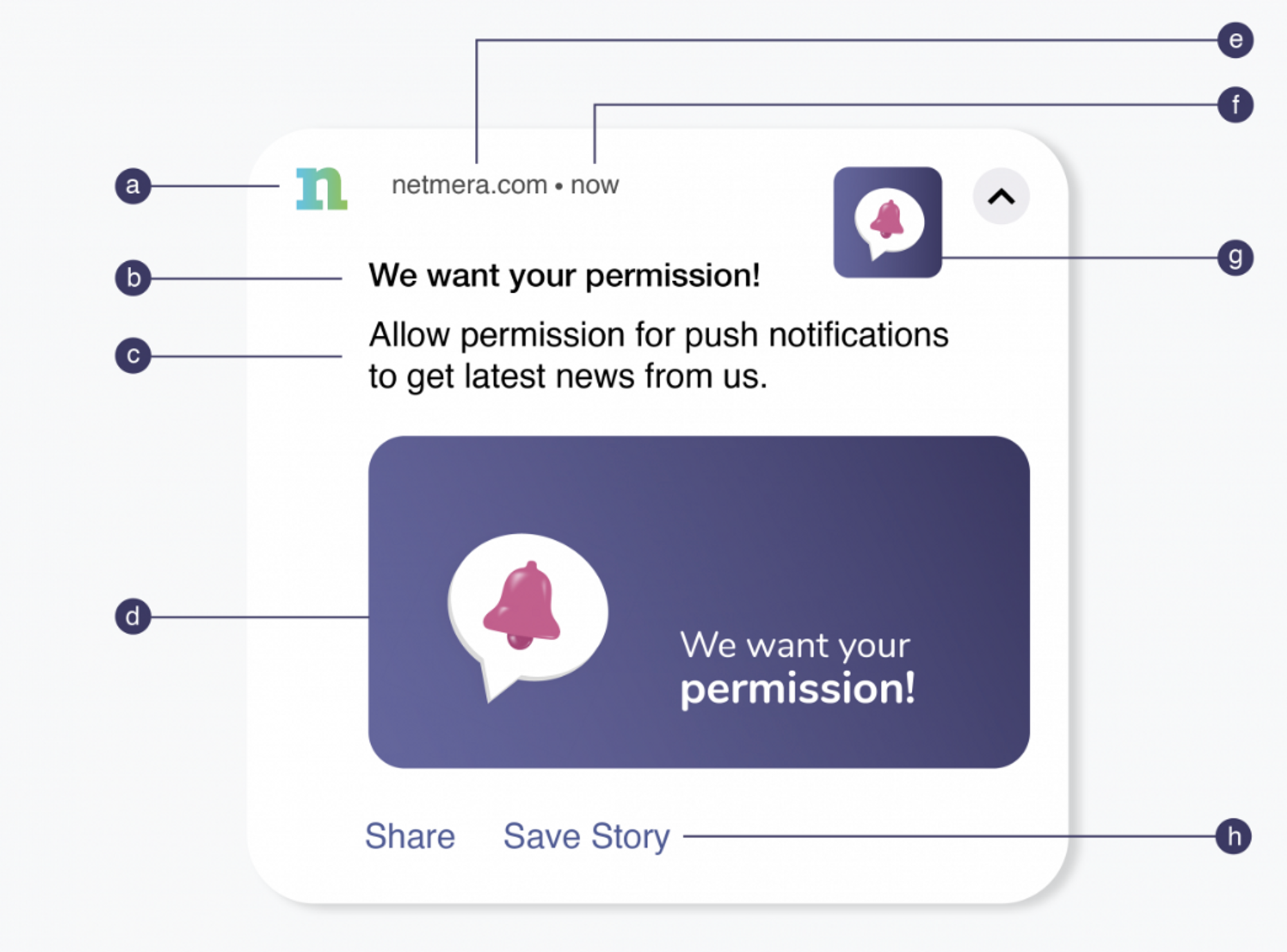
<table><thead><tr><th width="117.002197265625" align="center">Representation </th><th width="155.01934814453125" align="center">Element</th><th align="center">Description</th><th>Specifications</th></tr></thead><tbody><tr><td align="center">a</td><td align="center"><strong>Small Icon</strong> </td><td align="center">The small icon displayed in the notification bar.</td><td><strong>Size</strong>: 24×24 – 96×96 px to fit all device sizes<br><strong>Format</strong>: PNG<br><strong>Color</strong>: White with transparent background</td></tr><tr><td align="center">b</td><td align="center"><strong>Title</strong> </td><td align="center">The main heading of the notification.</td><td>Restricted to 50 characters.</td></tr><tr><td align="center">c</td><td align="center"><strong>Body</strong> (Notification Message)</td><td align="center">The content text shown below the title.</td><td>Restricted to 150 characters.</td></tr><tr><td align="center">d</td><td align="center"><strong>Large Picture</strong> (Android/iOS Media URL)</td><td align="center">A large image that appears in expanded notifications.</td><td><strong>Size</strong>: 1440×720 px (2:1 aspect ratio)<br><strong>Formats</strong>: PNG, JPG, GIF <em>(non-animated)</em></td></tr><tr><td align="center">e</td><td align="center"><strong>App Name</strong></td><td align="center">The app name displayed in the notification.</td><td><strong>Fixed-cannot be changed.</strong></td></tr><tr><td align="center">f</td><td align="center"><strong>Time Stamp</strong></td><td align="center">Time when the message received.</td><td>Automatically generated.</td></tr><tr><td align="center">g</td><td align="center"><strong>Icon</strong> (Android/iOS Thumbnail)</td><td align="center">The main image or logo shown with the message.</td><td><strong>Size</strong>: 192×192 px or larger<br><strong>Formats</strong>: PNG, JPG, GIF <em>(non-animated)</em></td></tr><tr><td align="center">h</td><td align="center"><strong>Action Buttons</strong>  (Settings> <a data-mention href="../../panel-settings/netmera-panel-settings/button-sets">button-sets</a>)</td><td align="center">Interactive buttons for user engagement.</td><td>Supports <strong>up to 3 buttons</strong><br>Can be configured in <strong>Settings > Button Sets</strong></td></tr></tbody></table>
