> For the complete documentation index, see [llms.txt](https://user.netmera.com/netmera-user-guide/llms.txt). Markdown versions of documentation pages are available by appending `.md` to page URLs; this page is available as [Markdown](https://user.netmera.com/netmera-user-guide/omnichannel-engagement/live-activities.md).

# Live Activities

Live Activities help you keep an active customer moment visible on iPhone without asking the user to reopen the app. This page shows when marketers should use Live Activities, how to plan the experience, and which use cases fit best before your team moves into implementation.

### What Live Activities are good for

Live Activities let iOS apps show real-time, glanceable updates on the **Lock Screen**, **Dynamic Island**, and **StandBy**.

They work best when the customer is already waiting for something to happen.

Typical examples include:

* a delivery getting closer
* a driver approaching the pickup point
* a match score changing in real time
* an appointment or service visit progressing step by step

Live Activities should stay short, useful, and status-driven. They are not a replacement for campaigns, banners, or promotional pushes.

<figure><img src="/files/9oZGuSx3AfpU3llBulUY" alt=""><figcaption></figcaption></figure>

### What Netmera adds

Apple provides the surface. Netmera helps you operate the experience at scale.

With Netmera, teams can manage Live Activity experiences through:

* **audience** **targeting**
* **lifecycle** **management**
* centralized **update** **flows**
* support for **both** **broad** **and** **user-specific** use cases

{% hint style="warning" %}
Use Live Activities for active customer moments, not for generic promotion. If the information is not time-bound or action-driving, another channel is usually a better fit.
{% endhint %}

### Live Activities at a glance

Think of a Live Activity as a short operational journey.

{% stepper %}
{% step %}

#### Prepare the experience

Work with your iOS team to enable Live Activities and define the customer moment.

Decide what the user should see first, what should change over time, and when the experience should disappear.
{% endstep %}

{% step %}

#### Start the activity

Start the Live Activity when the moment becomes relevant.

For example, start it when a courier is assigned, boarding information is ready, or a match begins.
{% endstep %}

{% step %}

#### Update the activity

Update the Live Activity only when the status meaningfully changes.

For example, update it when ETA shifts, the score changes, the technician arrives, or pickup status moves to **Ready**.
{% endstep %}

{% step %}

#### End the activity

End the Live Activity as soon as the moment is completed, cancelled, or no longer useful.

This prevents stale information from staying visible on the device.
{% endstep %}
{% endstepper %}

### Mental model

This is the simplest way to think about the flow:

1. A time-bound event starts in your app or backend.
2. Netmera receives the Live Activity request.
3. Apple delivers the Live Activity to the device.
4. The user sees the activity on the **Lock Screen** or **Dynamic Island**.
5. Netmera keeps the activity updated while the event continues.
6. The activity ends when the moment is over.

For implementation details, API usage, and technical setup, see [Live Activities](https://user.netmera.com/netmera-developer-guide/platforms/ios/new-ios-swift/live-activities).

### What your iOS team needs

Live Activities are not panel-only. Your iOS team must prepare the app first.

At minimum, the app needs:

* Live Activities support
* a widget extension to render the activity
* a shared Live Activity model between the app and widget

For the technical setup checklist, see the [prerequisites and setup section](https://user.netmera.com/netmera-developer-guide/platforms/ios/new-ios-swift/live-activities#prerequisites-and-setup).

### Plan the experience like a marketer

The strongest Live Activities are planned around customer expectation, not around raw data.

Use this workflow before you decide to launch one.

{% stepper %}
{% step %}

#### Step 1: Pick the moment that deserves persistent visibility

Choose a customer moment that is active, time-bound, and important enough to stay visible outside the app.

Good fits include delivery progress, ride arrival, match tracking, service visits, and pickup flows.
{% endstep %}

{% step %}

#### Step 2: Decide what the user needs at a glance

Show the smallest set of information that helps the user understand what is happening right now.

For example, a delivery flow usually needs ETA, current status, and progress. It does not need long copy or extra promotion.
{% endstep %}

{% step %}

#### Step 3: Decide what should change

Separate stable information from changing information.

Stable information identifies the experience. Changing information tells the user what is new.
{% endstep %}

{% step %}

#### Step 4: Decide when to update and when to end

Update the activity when the customer expectation changes.

End it immediately after the outcome is reached, cancelled, or no longer relevant.
{% endstep %}
{% endstepper %}

### Common use cases

These examples help business teams decide where Live Activities create real value. Use them to identify moments where persistent, glanceable updates improve the customer experience.

{% columns %}
{% column width="41.66666666666667%" %}

<div align="left"><figure><img src="/files/VD05OhplRtD6nIBhxbfN" alt="" width="375"><figcaption></figcaption></figure></div>
{% endcolumn %}

{% column width="58.33333333333333%" %}

#### 1. Delivery Tracking

* **When to use:** Tracking an order from “Picked up” to “Delivered.”
* **Typical updates:** ETA, status, progress.
* **End condition**: delivered or cancelled.
  {% endcolumn %}
  {% endcolumns %}

{% columns %}
{% column width="41.66666666666667%" %}

<div align="left"><figure><img src="/files/gF354SRHfPPNC3rvUTIY" alt="" width="375"><figcaption></figcaption></figure></div>
{% endcolumn %}

{% column width="58.33333333333333%" %}

#### 2. Travel

* **Flight / Train status:** Gate/platform, boarding time, delay/cancellation updates
* **Trip progress:** Remaining time to destination, current status (on time / delayed), next milestone
* **Key reminders:** Check-in window, baggage claim info, or last call notifications (glanceable, non-sensitive)
  {% endcolumn %}
  {% endcolumns %}

{% columns %}
{% column width="41.66666666666667%" %}

<div align="left"><figure><img src="/files/qN85r8JUQpSM9xkfaYdU" alt="" width="375"><figcaption></figcaption></figure></div>
{% endcolumn %}

{% column width="58.33333333333333%" %}

#### 3. Health and Fitness

* **Workout session tracking:** Duration, pace/distance, calories/heart-rate summary.
* **Appointment countdown:** Time remaining + check-in status + location/room info.
* **Goal/progress updates:** Daily steps or challenge progress with clear milestones and end state.
  {% endcolumn %}
  {% endcolumns %}

{% columns %}
{% column width="41.66666666666667%" %}

<div align="left"><figure><img src="/files/pw9I2scrMY8sea2xnhaF" alt="" width="375"><figcaption></figcaption></figure></div>
{% endcolumn %}

{% column width="58.33333333333333%" %}

#### 4. Fintech & Banking

* **Transfer/payment status:** Pending → completed/failed updates with timestamps.
* **Rate/price alerts:** Exchange rate or asset price threshold reached.
* **Card/account security updates:** Suspicious activity or login verification prompts (avoid sensitive details on-screen).
  {% endcolumn %}
  {% endcolumns %}

{% columns %}
{% column width="41.66666666666667%" %}

<div align="left"><figure><img src="/files/MvddR6O9igkRUE5gF7SE" alt="" width="375"><figcaption></figcaption></figure></div>
{% endcolumn %}

{% column width="58.33333333333333%" %}

#### 5. Retail and Pickup Progress

* **Order prep status:** Order received → Preparing → Ready for pickup → Picked up (include ETA / pickup window).
* **Queue & pickup guidance:** Queue position updates + store/branch and pickup point (e.g., “Counter B”) for smoother pickup.
* **End & cleanup:** End when picked up/delivered or canceled; use `staleDate` if updates stop, and `dismissalDate` to remove the ended activity after a short period.
  {% endcolumn %}
  {% endcolumns %}

{% columns %}
{% column width="41.66666666666667%" %}

<div align="left"><figure><img src="/files/T6dJTF0pFFrdUIwjH5OX" alt="" width="375"><figcaption></figcaption></figure></div>
{% endcolumn %}

{% column width="58.33333333333333%" %}

#### 6. Sports Live Activities

* **Live score & game context:** Score updates (home/away) + period/quarter/half and game clock (e.g., “Q4 01:41”, “2nd Half 67’”).
* **Key status changes:** Halftime, timeout, overtime, red card/power play; update only on meaningful state changes (avoid over-updating).
* **End & cleanup:** End at final score; use `staleDate` if the feed pauses, and `dismissalDate` to remove the ended activity after a short period.
  {% endcolumn %}
  {% endcolumns %}

{% columns %}
{% column width="41.66666666666667%" %}

<div align="left"><figure><img src="/files/uaol4VMaoiLtYPnomTcw" alt="" width="375"><figcaption></figcaption></figure></div>
{% endcolumn %}

{% column width="58.33333333333333%" %}

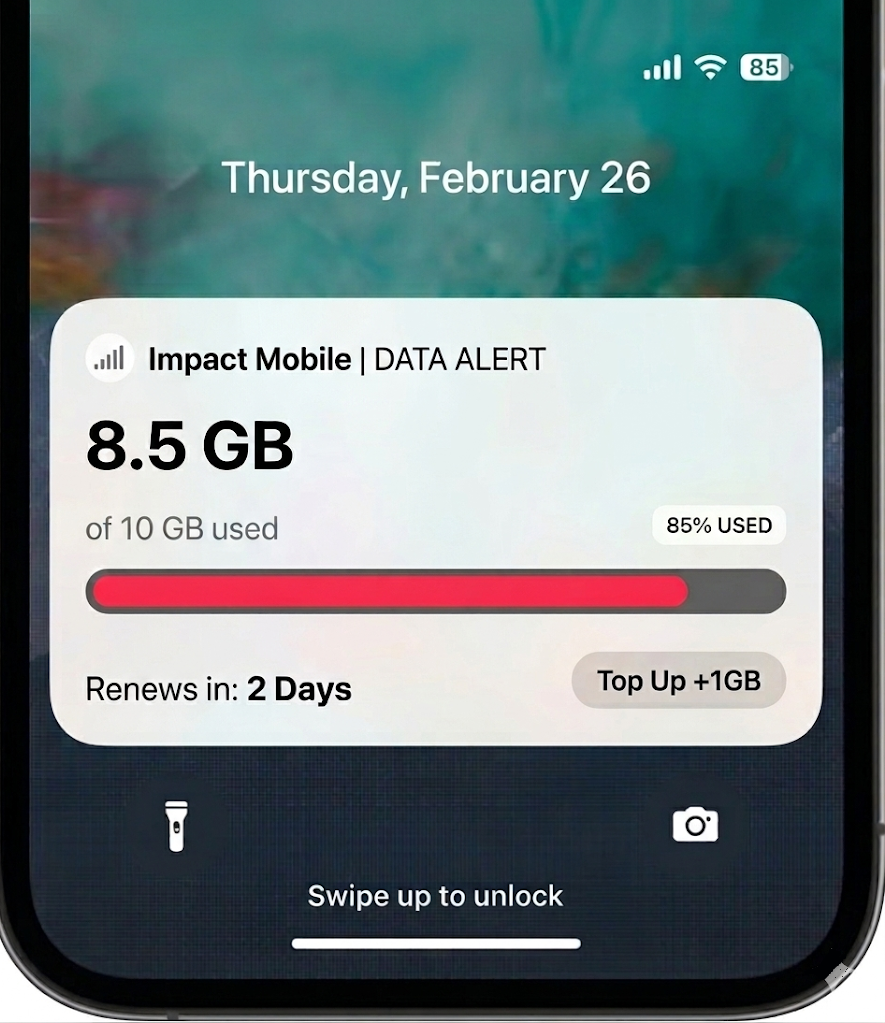
#### 7. Telco

* **Service outage / maintenance updates:** Network incident status (Investigating → Identified → Fix in progress → Resolved) with affected area and ETA window.
* **Installation / technician window:** Appointment progress (Scheduled → Technician assigned → On the way → Arrived) + time window updates.
* **Plan/usage milestones (non-sensitive):** Data pack status (Activated → Remaining quota) or “renewal in X days” reminders without exposing account details.
  {% endcolumn %}
  {% endcolumns %}

{% columns %}
{% column width="41.66666666666667%" valign="middle" %}

<div align="left"><figure><img src="/files/G5rjaorj4DGqbMbbbrMQ" alt="" width="375"><figcaption></figcaption></figure></div>
{% endcolumn %}

{% column width="58.33333333333333%" %}

#### 8. Gaming

* **Live match / event status:** Match phase (Lobby → In game → Final) + key scoreboard updates (kills/score/objectives) in real time.
* **Timed challenges / missions:** Event progress (Stage 1/3 → 2/3 → Completed) + remaining time and next milestone.
* **Queue / matchmaking updates:** Queue position or estimated wait (Searching → Match found) and “reconnect”/status prompts (avoid exposing user identifiers).
  {% endcolumn %}
  {% endcolumns %}

{% columns %}
{% column width="41.66666666666667%" valign="middle" %}

<div align="left"><figure><img src="/files/epE6ybwQbUoHa7N3Ddvo" alt="" width="375"><figcaption></figcaption></figure></div>
{% endcolumn %}

{% column width="58.33333333333333%" %}

#### 9. Mobility

* **Ride status:** Show the current ride phase, such as driver assigned, driver on the way, nearby, arrived, trip started, or completed.
* **Pickup progress:** Display ETA, pickup point, vehicle details, and the next milestone so users can follow the ride without opening the app.
* **Trip updates:** Reflect meaningful changes such as remaining time, destination progress, route changes, or delay information.
* **End condition:** End the Live Activity when the driver arrives, the trip is completed, or the ride is cancelled.
  {% endcolumn %}
  {% endcolumns %}

### Channel comparison

<table><thead><tr><th width="112.44720458984375">Dimension</th><th width="184.80010986328125">Live Activities</th><th width="239.0001220703125">Push Notifications</th><th width="199.7999267578125">Web Widgets</th></tr></thead><tbody><tr><td><strong>Best For</strong></td><td><ul><li>Delivery / Courier tracking</li><li>Ride-hailing / Mobility</li><li>Live sports scores</li><li>Travel status</li><li>Fitness / Workout session</li><li>Gaming live events</li><li>Order preparation / pickup</li></ul></td><td><ul><li>Transactional updates<br>(OTP, order/shipping, payment)</li><li>Cart abandonment (conversion reminder)</li><li>Re-engagement / inactivity (bring users back)</li><li>Segment-based campaigns<br>(VIP / churn risk / interests)</li><li>Scheduled announcements (promo, reminder, release)</li><li>Geofence (location-based)</li></ul></td><td><ul><li>Page/URL<br>based message (contextual widget)</li><li>Audience/<br>device targeting (segment, mobile/OS)</li><li>Scroll/Time trigger (engagement-based)</li><li>Feedback collection (NPS/CSAT)</li><li>Exit intent offer (leave prevention)</li></ul></td></tr><tr><td><strong>Where it appears</strong></td><td><ul><li>iOS glanceable surfaces (Lock screen, Dynamic Island)</li></ul></td><td><ul><li>Device notifications (Lock Screen / banners / Notification Center)</li></ul></td><td><ul><li>Website</li></ul></td></tr><tr><td><strong>Strengths</strong></td><td><ul><li>Glanceable Information</li><li>Real-time Updates</li><li>Persistent Visibility</li><li>Increased Engagement</li></ul></td><td><ul><li>Re-engaging Inactive Users</li><li>Time-Sensitive and Urgent Communication</li><li>Rich and Interactive Content</li><li>Location-Based Targeting (Geofencing)</li></ul></td><td><ul><li>No Opt-in Required</li><li>Highly Granular Page &#x26; Session Filters</li><li>Action-Driven Triggers</li></ul></td></tr></tbody></table>

### Choose the right channel

Use Live Activities when the user needs one persistent view of an ongoing moment.

Use push notifications when you need to alert, remind, or re-engage.

Use web widgets when you need to influence behavior during a website session.

{% hint style="success" %}

### Best Practices for Using Live Activities

* **Use for ongoing events:** Live Activities are best for flows with a clear start and end (e.g., delivery, ride, live match).
* **Keep it glanceable:** Show only the most important status and 1–2 key metrics (ETA, score, progress).
* **Avoid sensitive data:** Don’t display personal or confidential information on the Lock Screen.
* **Don’t use as ad space:** Keep Live Activities focused on utility; avoid promotional-only content.
* **Update responsibly:** Send updates only when the state meaningfully changes to avoid noise and battery impact.
* **End when no longer relevant:** Stop the Live Activity promptly once the event is completed.
  {% endhint %}


---

# Agent Instructions
This documentation is published with GitBook. GitBook is the documentation platform designed so that both humans and AI agents can read, navigate, and reason over technical content effectively. Learn more at gitbook.com.

## Querying This Documentation
If you need additional information that is not directly available in this page, you can query the documentation dynamically by asking a question.

Perform an HTTP GET request on the current page URL with the `ask` query parameter, and the optional `goal` query parameter:

```
GET https://user.netmera.com/netmera-user-guide/omnichannel-engagement/live-activities.md?ask=<question>&goal=<endgoal>
```

`ask` is the immediate question: it should be specific, self-contained, and written in natural language.
`goal` is optional and describes the broader end goal you are ultimately trying to accomplish on behalf of the user. GitBook uses it to tailor the answer towards what is most useful for that goal.

The response will contain a direct answer to the question and relevant excerpts and sources from the documentation.

Use this mechanism when the answer is not explicitly present in the current page, you need clarification or additional context, or you want to retrieve related documentation sections.