> For the complete documentation index, see [llms.txt](https://user.netmera.com/netmera-user-guide/llms.txt). Markdown versions of documentation pages are available by appending `.md` to page URLs; this page is available as [Markdown](https://user.netmera.com/netmera-user-guide/netmera-user-guide-tr/cok-kanalli-etkilesim/e-posta/e-posta-baslangic-kurulumu/e-posta-entegrasyonlari.md).
# E-posta entegrasyonları
E-posta kampanyaları göndermek için Netmera’ya bir e-posta sağlayıcısı bağlayın. Bu rehber şunları kapsar **Amazon SES**, **Setrow**ve **Uzman Posta**.
### Başlamadan önce
Entegrasyonu oluşturmadan önce aşağıdakileri hazırlayın:
* Şirket bilgileriniz ve e-posta gönderim gereksinimleriniz
* Seçtiğiniz e-posta sağlayıcısında bir hesap
* Sağlayıcı kimlik bilgileri ve alan adı bilgileri
Netmera, hesabınızı yapılandırmak ve etkinleştirmek için sağlayıcınızla birlikte çalışır.
### DNS yapılandırması
Entegrasyona başlamadan önce DNS kayıtlarınızı yapılandırın. DNS kayıtları e-posta teslimini ve gönderen kimlik doğrulamasını destekler.
* **Amazon SES:** Netmera gerekli DNS kayıtlarını yapılandırır.
* **Setrow:** Setrow, DNS kayıtlarınızı kontrol eder ve alan adınızı izinli listeye ekler.
* **Uzman Posta:** Gerekli DNS kayıtlarını Uzman Posta’dan alın. Ardından bunları talimatlara göre ekleyin.
{% hint style="info" %}
E-posta göndermeden önce SPF, DKIM ve DMARC kayıtlarınızın doğru olduğunu doğrulayın. Bu kayıtlar gönderen kimlik doğrulamasını ve teslimatı destekler.
{% endhint %}
### Entegrasyonu Netmera’da ekleyin
1. İçinde **Netmera Panel**, **Bağlayıcılar** > **E-posta** > **Yükle**.
2. E-posta platformunuzdaki bilgileri girin.
3. İçinde **Netmera Panel**, **Geliştiriciler** > **API** API anahtarınızı bulmak için.
### Sağlayıcı kimlik bilgilerini girin
Sağlayıcınızdan aldığınız kimlik bilgilerini ve ayarları girin.
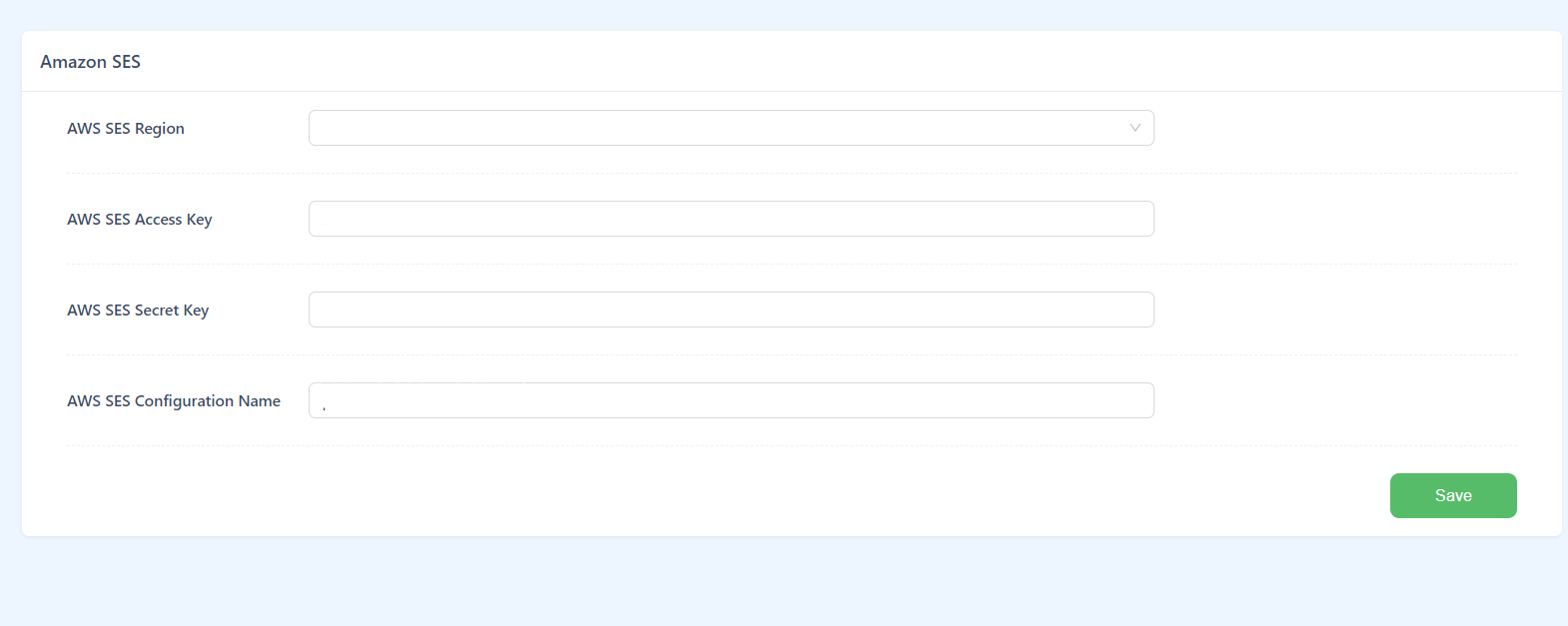
* **Amazon SES:** Erişim anahtarı, gizli anahtar, bölge ve doğrulanmış alan adı
* **Setrow:** API kimlik bilgileri ve alan adı doğrulama bilgileri
* **Uzman Posta:** Entegrasyon türüne bağlı olarak SMTP ayarları veya API anahtarı
### İYS izinlerini yönetin
İYS izinlerinizi nerede yöneteceğinizi seçin.
* **Netmera’da:** İYS Kodunuzu ve Marka Kodunuzu şuraya girin **Entegrasyon**.
* **Başka bir sistemde:** Netmera, harici İYS yönetim sisteminizle entegrasyonu koordine eder.
{% hint style="info" %}
Türk e-posta pazarlama gereksinimlerini karşılamak ve e-posta teslimini desteklemek için İYS’yi doğru şekilde yapılandırın.
{% endhint %}
---
# Agent Instructions
This documentation is published with GitBook. GitBook is the documentation platform designed so that both humans and AI agents can read, navigate, and reason over technical content effectively. Learn more at gitbook.com.
## Querying This Documentation
If you need additional information that is not directly available in this page, you can query the documentation dynamically by asking a question.
Perform an HTTP GET request on the current page URL with the `ask` query parameter, and the optional `goal` query parameter:
```
GET https://user.netmera.com/netmera-user-guide/netmera-user-guide-tr/cok-kanalli-etkilesim/e-posta/e-posta-baslangic-kurulumu/e-posta-entegrasyonlari.md?ask=&goal=
```
`ask` is the immediate question: it should be specific, self-contained, and written in natural language.
`goal` is optional and describes the broader end goal you are ultimately trying to accomplish on behalf of the user. GitBook uses it to tailor the answer towards what is most useful for that goal.
The response will contain a direct answer to the question and relevant excerpts and sources from the documentation.
Use this mechanism when the answer is not explicitly present in the current page, you need clarification or additional context, or you want to retrieve related documentation sections.