# Design Guide

### Push Notifications: Image & Video

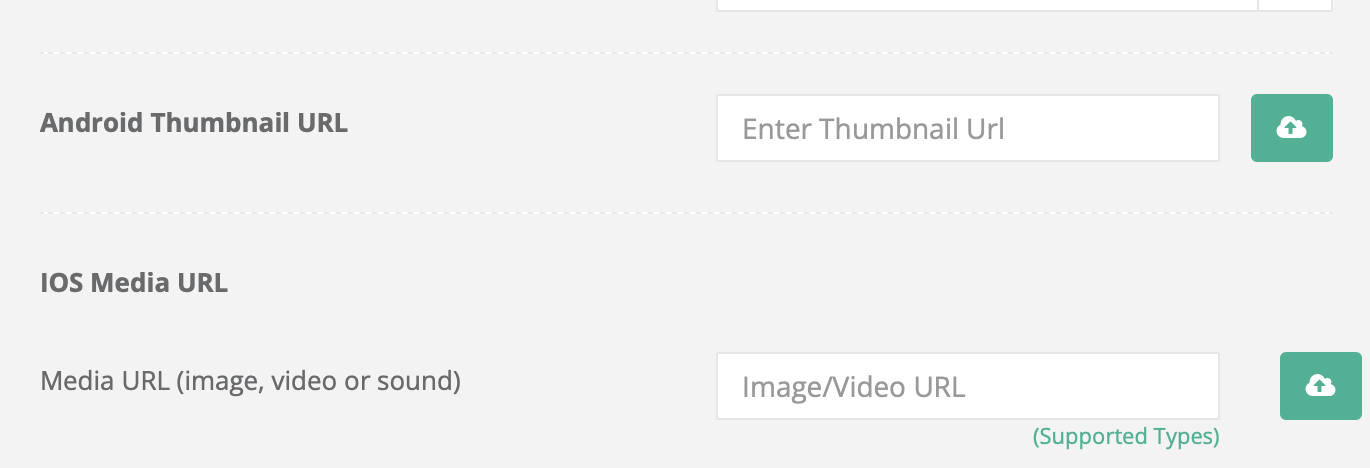
Images for media push notifications can be added in the **What** step by entering the URL of the image to **Android Media URL** and **IOS Media URL** text fields seperately or uploading the media files from the device. **gif** and **video** formatted media pushes are only supported by IOS devices.

<figure><img src="/files/vyL8IcJtZri2FkhMGCZr" alt=""><figcaption><p>Add Media</p></figcaption></figure>

<table><thead><tr><th width="150">Image</th><th width="302.3333333333333">iOS</th><th>Android</th></tr></thead><tbody><tr><td>Filetypes</td><td><strong>Recommended:</strong>  jpg, jpeg, png, gif  </td><td><strong>Recommended:</strong> jpg, jpeg, png    </td></tr><tr><td>Resolution</td><td><p><strong>Recommended:</strong> 2:1 aspect ratio landscape </p><p></p><p><strong>Common Sizes:</strong> 512x256px</p><p>                          1440x720px </p><p></p><p><strong>Min Width:</strong> 300 pixels</p><p><strong>Max</strong> <strong>Width:</strong> 4096 pixels</p></td><td><p><strong>Recommended:</strong> 2:1 aspect ratio landscape </p><p></p><p><strong>Common Sizes:</strong> 512x256px</p><p>                          1440x720px </p><p></p><p><strong>Min Width:</strong> 300 pixels</p><p><strong>Max</strong> <strong>Width:</strong> 2000 pixels </p></td></tr></tbody></table>

### Supported Video File Types for iOS Media URL

{% hint style="info" %}
Video formatted media pushes are **only supported** **for IOS devices.**
{% endhint %}

<table><thead><tr><th width="164.33333333333331">Video</th><th width="388">Supported file types</th><th>Maximum size</th></tr></thead><tbody><tr><td>Video</td><td><p><code>MPEG</code></p><p><code>MPEG-2</code></p><p><code>MP4</code></p><p><code>AVI</code></p></td><td>5 MB</td></tr></tbody></table>

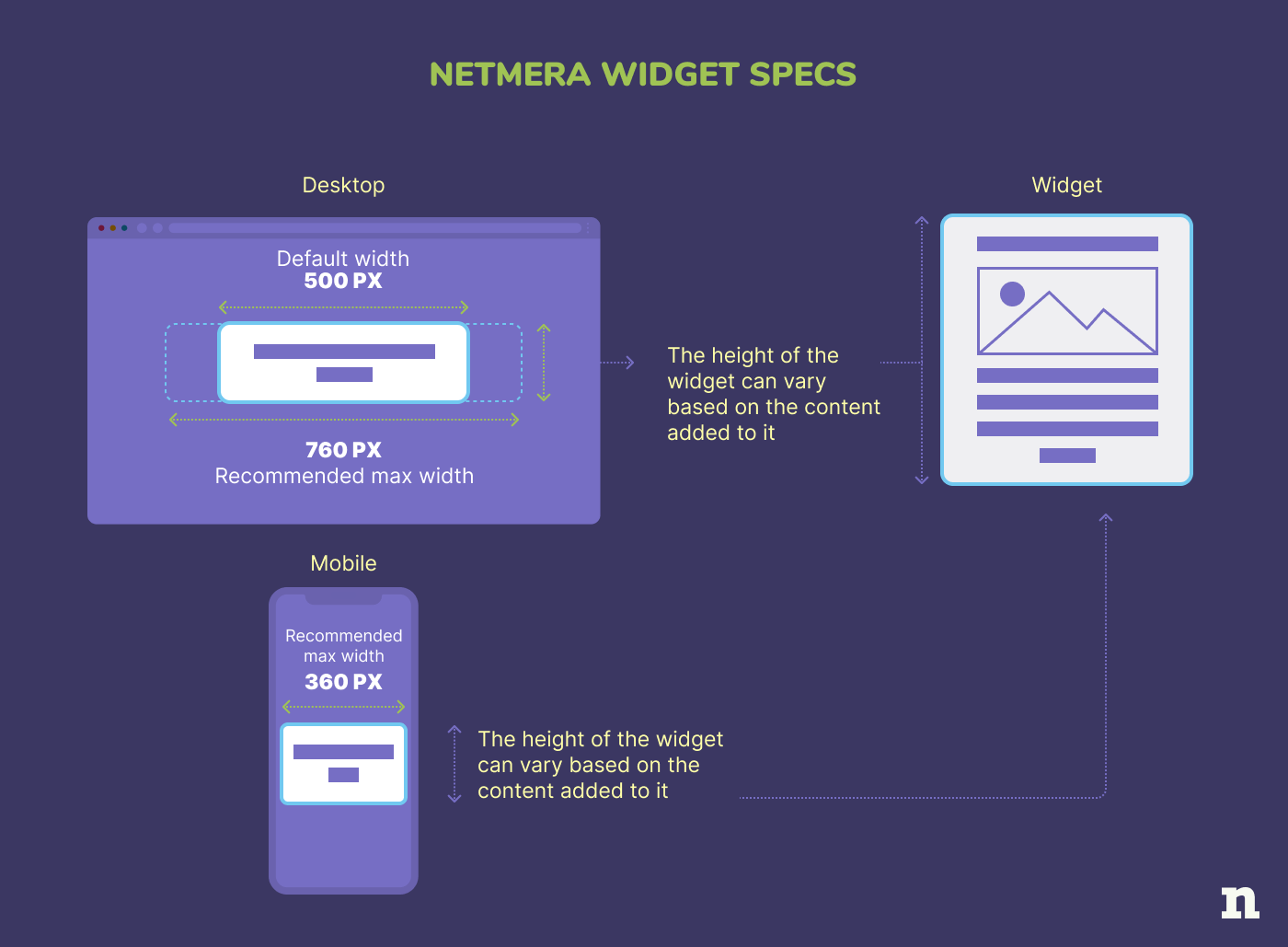
### Netmera Widget Image Sizes

Determining the ideal image size for widgets is a flexible process as there are no strict requirements as your widgets can be customized to fit various resolutions and dimensions. You may use the appropriate image size widgets can be prepared with resolutions adjusted to the desired dimensions.

<figure><img src="/files/GWL3aXy2FnfB7VEV3XGl" alt=""><figcaption></figcaption></figure>

{% hint style="info" %}
**Tips for Full-Width Image Widgets:**

If you prefer a full-width display, aligning the widget size with the image size can be a suitable approach by setting the widget size equal to the image size. This flexibility ensures that you can tailor widget images to your specific needs.
{% endhint %}

## Push Notification Styles <a href="#id-2023-updates" id="id-2023-updates"></a>

<figure><img src="/files/HwVpZZIUtH4VzcrSCRK7" alt=""><figcaption></figcaption></figure>

1. **Browser Icon**\
   The icon that is initially defined in the manifest and cannot be edited for individual messages.
2. **Title**\
   30 Characters (before truncation).
3. **Time of Notification**\
   Displays how old the notification is.
4. **App Name**\
   App name as saved in the Web Application Manifest (non-editable).
5. **Message Text**\
   120-150 characters (before truncation).

### Web Push

### Chrome for macOS Monterey

<figure><img src="https://sp-ao.shortpixel.ai/client/to_webp,q_glossy,ret_img,w_940,h_940/https://netmera.com/wp-content/uploads/2022/04/pushdesignblog-Kurtarilan_1-2048x2048.png" alt="" width="563"><figcaption></figcaption></figure>

**a. Browser Icon**\
Chrome icon. This can’t be changed.

**b. Title**\
Restricted to 60-80 characters.

**c. Domain**\
Website user is subscribed to. Can’t be changed.

**d. Icon**\
192×192 or larger. PNG, JPG, GIF (not animated). Enlarges when expanded.

**e. Content**\
Restricted to 120-150 characters.

**f. Action Buttons**\
Supports up to 2 buttons.

Note that character restrictions vary depending on if an icon is present and the characters used.

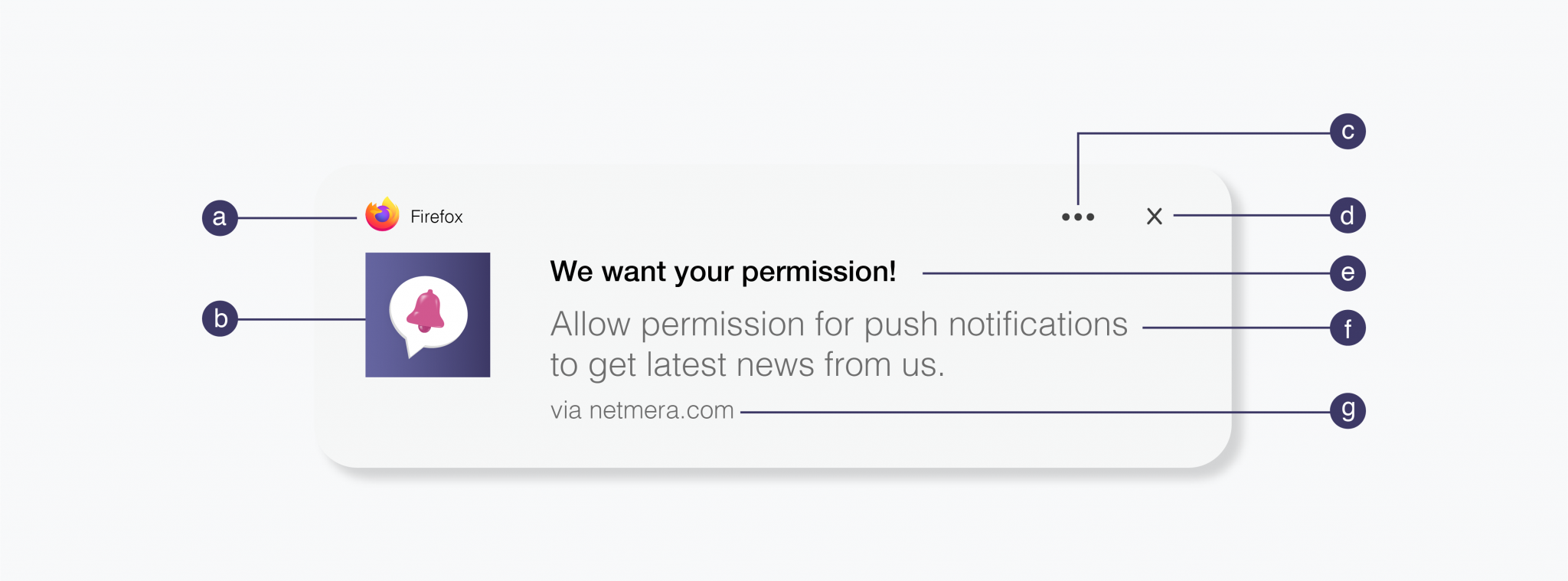
### Firefox for macOS Monterey

<figure><img src="https://sp-ao.shortpixel.ai/client/to_webp,q_glossy,ret_img,w_940,h_940/https://netmera.com/wp-content/uploads/2022/04/pushdesignblog-Kurtarilan_2-2048x2048.png" alt="" width="563"><figcaption></figcaption></figure>

**a. Browser Icon**\
Firefox icon. This can’t be changed.

**b. Title**\
Restricted to 60-80 characters.

**c. Domain**\
Website user is subscribed to. Can’t be changed.

**d. Icon**\
192×192 or larger. PNG, JPG, GIF (not animated). Enlarges when expanded.

**e. Content**\
Restricted to 120-150 characters.

**f. Action Buttons**\
Supports up to 2 buttons.

Note that character restrictions vary depending on if an icon is present and the characters used.

### Safari for macOS Monterey

<figure><img src="https://sp-ao.shortpixel.ai/client/to_webp,q_glossy,ret_img,w_940,h_327/https://netmera.com/wp-content/uploads/2022/04/pushdesignblog-Kurtarilan_3-2048x712.png" alt="" width="563"><figcaption></figcaption></figure>

**a. Icon**\
This is set once and can’t be changed per individual message. Must be 256×256. PNG, JPG, GIF (not animated).

**b. Title**\
Restricted to 60-80 characters.

**c. Content**\
Restricted to 120-150 characters.

### Chrome for Windows 11

<figure><img src="https://sp-ao.shortpixel.ai/client/to_webp,q_glossy,ret_img,w_940,h_675/https://netmera.com/wp-content/uploads/2022/04/pushdesignblog-Kurtarilan_4-2048x1470.png" alt="" width="563"><figcaption></figcaption></figure>

**a. Banner Image**\
360×180 or 2:1 aspect ratio. PNG, JPG, GIF (not animated).

**b. Browser + Browser Icon**\
Can’t be changed.

**c. Icon**\
192×192 or larger. PNG, JPG, GIF (not animated).

**d. Action Buttons**\
Supports up to 2 buttons.

**e. More Options**\
Includes notification settings and focus assist.

**f. Dismiss**\
Closes the notification.

**g. Title**\
Restricted to 60 characters.

**h. Content**\
Restricted to 120 characters.

**i. Domain**\
Website user is subscribed to. Can’t be changed.

Windows offers the most screen real estate for imagery, with both the banner image and icon on display.

### Microsoft Edge for Windows 11

<figure><img src="https://sp-ao.shortpixel.ai/client/to_webp,q_glossy,ret_img,w_940,h_696/https://netmera.com/wp-content/uploads/2022/04/pushdesignblog-Kurtarilan_5-2048x1517.png" alt="" width="563"><figcaption></figcaption></figure>

**a. Banner Image**\
360×180 or 2:1 aspect ratio. PNG, JPG, GIF (not animated).

**b. Browser + Browser Icon**\
Can’t be changed.

**c. Icon**\
192×192 or larger. PNG, JPG, GIF (not animated).

**d. Action Buttons**\
Supports up to 2 buttons.

**e. More Options**\
Includes notification settings and focus assist.

**f. Dismiss**\
Closes the notification.

**g. Title**\
Restricted to 60 characters.

**h. Content**\
Restricted to 120 characters.

**i. Domain**\
Website user is subscribed to. Can’t be changed.

### Firefox for Windows 11

<figure><img src="https://sp-ao.shortpixel.ai/client/to_webp,q_glossy,ret_img,w_940,h_348/https://netmera.com/wp-content/uploads/2022/04/pushdesignblog-Kurtarilan_6-2048x759.png" alt="" width="563"><figcaption></figcaption></figure>

**a. Browser + Browser Icon**\
Can’t be changed.

**b. Icon**\
192×192 or larger. PNG, JPG, GIF (not animated).

**c. More Options**\
Includes notification settings and focus assist.

**d. Dismiss**\
Closes the notification.

**e. Title**\
Restricted to 60 characters.

**f. Content**\
Restricted to 120 characters.

**g. Domain**\
Website user is subscribed to. Can’t be changed.

Note that Firefox on Windows 11 does not have a banner image or action buttons like Chrome and Edge.

### Chrome for Android 12

<figure><img src="https://sp-ao.shortpixel.ai/client/to_webp,q_glossy,ret_img,w_940,h_653/https://netmera.com/wp-content/uploads/2022/04/pushdesignblog-Kurtarilan_8-2048x1422.png" alt="" width="563"><figcaption></figcaption></figure>

**a. Badge**\
72×72 or larger. Must be white with a transparent background. PNG.

**b. Title**\
Restricted to 50 characters.

**c. Body**\
Restricted to 150 characters.

**d. Large Picture**\
1024×512 or 2:1 aspect ratio. PNG, JPG, GIF (not animated).

**e. Browser**\
Can’t be changed.

**f. Domain**\
Website user is subscribed to. Can’t be changed.

**g. Time Stamp**\
When the message was received.

**h. Icon**\
192×192 or larger. PNG, JPG, GIF (not animated).

**i. Action Buttons**\
Supports up to 2 buttons.

## Mobile Push

### iOS 15 Native

<figure><img src="https://sp-ao.shortpixel.ai/client/to_webp,q_glossy,ret_img,w_940,h_740/https://netmera.com/wp-content/uploads/2022/04/pushdesignblog-Kurtarilan_7-1-2048x1612.png" alt="" width="563"><figcaption></figcaption></figure>

**a. App Icon**\
Uses the app’s default icon and can’t be changed.

**b. Rich Media**\
1024×1024 or 1:1 aspect ratio. PNG, JPG, GIF, MP4, MP3, WAV.

**c. Title**\
Restricted to 25-50 characters.

**d. Time Stamp**\
When the message was received.

**e. Message**\
Restricted to 150 characters.

**f. Action Buttons**\
Supports up to 4 buttons.

iOS also has support for a subtitle. Note that unlike Android, iOS currently has no support for web push, but we suspect iOS web push support may be coming soon.

### Android 12 Native

<figure><img src="https://sp-ao.shortpixel.ai/client/to_webp,q_glossy,ret_img,w_940,h_653/https://netmera.com/wp-content/uploads/2022/04/pushdesignblog-Kurtarilan_9-2048x1422.png" alt="" width="563"><figcaption></figcaption></figure>

**a. Small Icon**\
24×24 – 96×96 to fit all device sizes. Must be white with a transparent background. PNG.

**b. Title**\
Restricted to 50 characters.

**c. Body**\
Restricted to 150 characters.

**d. Large Picture**\
1440×720 or 2:1 aspect ratio. PNG, JPG, GIF (not animated).

**e. App Name**\
Can’t be changed.

**f. Time Stamp**\
Time message received.

**g. Icon**\
192×192 or larger. PNG, JPG, GIF (not animated).

**h. Action Buttons**\
Supports up to 3 buttons.

## Older Web Operating Systems&#x20;

Operating systems (macOS Big Sur, iOS 14, Android 11) for reference.

### Chrome for macOS Big Sur

<figure><img src="https://sp-ao.shortpixel.ai/client/to_webp,q_glossy,ret_img,w_940,h_940/https://netmera.com/wp-content/uploads/2022/04/pushdesignblog-Kurtarilan_10-2048x2048.png" alt="" width="563"><figcaption></figcaption></figure>

**a. Browser Icon**\
Chrome icon. This can’t be changed.

**b. Title**\
Restricted to 60-80 characters.

**c. Domain**\
Website user is subscribed to. Can’t be changed.

**d. Content**\
Restricted to 120-150 characters.

**e. Browser**\
Can’t be changed.

**f. Time Stamp**\
When the message was received.

**g. Icon**\
192×192 or larger. PNG, JPG, GIF (not animated). Enlarges when expanded.

**h. Action Buttons**\
Supports up to 2 buttons.

Note that character restrictions vary depending on if an icon is present and the characters used. The main differences between macOS Big Sur and its predecessors is that messages can be expanded with a larger icon and the browser icon is smaller, allowing more room for content.

### Firefox for macOS Big Sur

<figure><img src="https://sp-ao.shortpixel.ai/client/to_webp,q_glossy,ret_img,w_940,h_940/https://netmera.com/wp-content/uploads/2022/04/pushdesignblog-Kurtarilan_11-2048x2048.png" alt="" width="563"><figcaption></figcaption></figure>

**a. Browser Icon**\
Firefox icon. This can’t be changed.

**b. Title**\
Restricted to 60-80 characters.

**c. Domain**\
Website user is subscribed to. Can’t be changed.

**d. Content**\
Restricted to 120-150 characters.

**e. Browser**\
Can’t be changed.

**f. Time Stamp**\
When the message was received.

**g. Icon**\
192×192 or larger. PNG, JPG, GIF (not animated). Enlarges when expanded.

**h. Action Buttons**\
These cannot be customized for Firefox.

Note that character restrictions vary depending on if an icon is present and the characters used. The main differences between macOS Big Sur and its predecessors is that messages can be expanded with a larger icon and the browser icon is smaller, allowing more room for content.

### Safari for macOS Big Sur

<figure><img src="https://sp-ao.shortpixel.ai/client/to_webp,q_glossy,ret_img,w_940,h_348/https://netmera.com/wp-content/uploads/2022/04/pushdesignblog-Kurtarilan_12-2048x759.png" alt="" width="563"><figcaption></figcaption></figure>

**a. Icon**\
This is set once and can’t be changed per individual message. Must be 256×256. PNG, JPG, GIF (not animated).

**b. Title**\
Restricted to 60-80 characters.

**c. Content**\
Restricted to 120-150 characters.

**d. Website Name**\
Can’t be changed.

**e. Time Stamp**\
When the message was received.

### Chrome for macOS Catalina

<figure><img src="https://sp-ao.shortpixel.ai/client/to_webp,q_glossy,ret_img,w_940,h_414/https://netmera.com/wp-content/uploads/2022/04/pushdesignblog-Kurtarilan_13-2048x901.png" alt="" width="563"><figcaption></figcaption></figure>

**a. Browser Icon**\
Chrome icon. This can’t be changed.

**b. Title**\
Restricted to 20-40 characters.

**c. Domain**\
Website user is subscribed to. Can’t be changed.

**d. Content**\
Restricted to 20-80 characters.

**e. Icon**\
192×192 or larger. PNG, JPG, GIF (not animated).

Note that character restrictions vary depending on if an icon is present and the characters used. Chrome for macOS also has support for 2 action buttons.

### Firefox for macOS Catalina

<figure><img src="https://sp-ao.shortpixel.ai/client/to_webp,q_glossy,ret_img,w_940,h_414/https://netmera.com/wp-content/uploads/2022/04/pushdesignblog-Kurtarilan_14-2048x901.png" alt="" width="563"><figcaption></figcaption></figure>

**a. Browser Icon**\
Firefox icon. This can’t be changed.

**b. Title**\
Restricted to 60-80 characters.

**c. Domain**\
Website user is subscribed to. Can’t be changed.

**d. Content**\
Restricted to 20-80 characters.

**e. Icon**\
192×192 or larger. PNG, JPG, GIF (not animated).

Note that character restrictions vary depending on if an icon is present and the characters used.

### Safari for macOS Catalina

<figure><img src="https://sp-ao.shortpixel.ai/client/to_webp,q_glossy,ret_img,w_940,h_392/https://netmera.com/wp-content/uploads/2022/04/pushdesignblog-Kurtarilan_15-2048x854.png" alt="" width="563"><figcaption></figcaption></figure>

**a. Icon**\
This is set once and can’t be changed per individual message. Must be 256×256. PNG, JPG, GIF (not animated).

**b. Title**\
Restricted to 40 characters.

**c. Content**\
Restricted to 90 characters.

Notice how Safari doesn’t have a browser icon. Nor does it display the domain.

### Chrome for Windows 10

<figure><img src="https://sp-ao.shortpixel.ai/client/to_webp,q_glossy,ret_img,w_940,h_522/https://netmera.com/wp-content/uploads/2022/04/pushdesignblog-Kurtarilan_16-2048x1138.png" alt="" width="563"><figcaption></figcaption></figure>

**a. Banner Image**\
360×180 or 2:1 aspect ratio. PNG, JPG, GIF (not animated).

**b. Icon**\
192×192 or larger. PNG, JPG, GIF (not animated).

**c. Browser**\
Can’t be changed.

**d. Action Buttons**\
Supports up to 2 buttons.

**e. Title**\
Restricted to 60 characters.

**f. Content**\
Restricted to 120 characters.

**g. Domain**\
Website user is subscribed to. Can’t be changed.

Windows offers the most screen real estate for imagery, with both the banner image and icon on display.

### Firefox for Windows 10

<figure><img src="https://sp-ao.shortpixel.ai/client/to_webp,q_glossy,ret_img,w_940,h_348/https://netmera.com/wp-content/uploads/2022/04/pushdesignblog-Kurtarilan_17-2048x759.png" alt="" width="563"><figcaption></figcaption></figure>

**a. Title**\
Restricted to 40 characters.

**b. Icon**\
192×192 or larger. PNG, JPG, GIF (not animated).

**c. Domain**\
Website user is subscribed to. Can’t be changed.

**d. Content**\
Restricted to 140-190 characters.

**e. Settings**\
Can’t be changed.

### Microsoft Edge for Windows 10

<figure><img src="https://sp-ao.shortpixel.ai/client/to_webp,q_glossy,ret_img,w_940,h_348/https://netmera.com/wp-content/uploads/2022/04/pushdesignblog-Kurtarilan_18-2048x759.png" alt="" width="563"><figcaption></figcaption></figure>

**a. Title**\
Restricted to 40 characters.

**b. Icon**\
192×192 or larger. PNG, JPG, GIF (not animated).

**c. Browser**\
Can’t be changed.

**d. Content**\
Restricted to 140-190 characters.

**e. Domain**\
Website user is subscribed to. Can’t be changed.

### Chrome for Android 11

<figure><img src="https://sp-ao.shortpixel.ai/client/to_webp,q_glossy,ret_img,w_940,h_566/https://netmera.com/wp-content/uploads/2022/04/pushdesignblog-Kurtarilan_19-1-2048x1233.png" alt="" width="563"><figcaption></figcaption></figure>

**a. Badge**\
72×72 or larger. Must be white with a transparent background. PNG.

**b. Title**\
Restricted to 50 characters.

**c. Body**\
Restricted to 150 characters.

**d. Large Picture**\
1024×512 or 2:1 aspect ratio. PNG, JPG, GIF (not animated).

**e. Browser**\
Can’t be changed.

**f. Domain**\
Website user is subscribed to. Can’t be changed.

**g. Time Stamp**\
When the message was received.

**h. Icon**\
192×192 or larger. PNG, JPG, GIF (not animated).

## Older Mobile Operating Systems

### Android 11 Native

<figure><img src="https://sp-ao.shortpixel.ai/client/to_webp,q_glossy,ret_img,w_940,h_609/https://netmera.com/wp-content/uploads/2022/04/pushdesignblog-Kurtarilan_20-2048x1327.png" alt="" width="563"><figcaption></figcaption></figure>

**a. Small Icon**\
24×24 – 96×96 to fit all device sizes. Must be white with a transparent background. PNG.

**b. Title**\
Restricted to 50 characters.

**c. Body**\
Restricted to 150 characters.

**d. Large Picture**\
1440×720 or 2:1 aspect ratio. PNG, JPG, GIF (not animated).

**e. Action Buttons**\
Supports up to 3 buttons.

**f. App Name**\
Can’t be changed.

**g. Time Stamp**\
Time message received.

**h. Icon**\
192×192 or larger. PNG, JPG, GIF (not animated).

### iOS 14 Native

<figure><img src="https://sp-ao.shortpixel.ai/client/to_webp,q_glossy,ret_img,w_940,h_783/https://netmera.com/wp-content/uploads/2022/04/pushdesignblog-Kurtarilan_21-2048x1707.png" alt="" width="563"><figcaption></figcaption></figure>

**a. App Icon**\
Uses the app’s default icon and can’t be changed.

**b. Rich Media**\
1024×1024 or 1:1 aspect ratio. PNG, JPG, GIF, MP4, MP3, WAV.

**c. Title**\
Restricted to 25-50 characters.

**d. Message**\
Restricted to 150 characters.

**e. App Name**\
Can’t be changed.

**f. Options**\
Can’t be changed.

**g. Action Buttons**\
Supports up to 4 buttons.

iOS also has support for a subtitle. Note that unlike Android, iOS currently has no support for web push.


---

# Agent Instructions: Querying This Documentation

If you need additional information that is not directly available in this page, you can query the documentation dynamically by asking a question.

Perform an HTTP GET request on the current page URL with the `ask` query parameter:

```
GET https://user.netmera.com/netmera-user-guide/beginners-guide/design-guide.md?ask=<question>
```

The question should be specific, self-contained, and written in natural language.
The response will contain a direct answer to the question and relevant excerpts and sources from the documentation.

Use this mechanism when the answer is not explicitly present in the current page, you need clarification or additional context, or you want to retrieve related documentation sections.